The Cockpit
Where you store your knowledge base matters as much as what’s in it. For multi-repo and collaborative projects, you need a cockpit — a private command center that orchestrates everything.

Across The Knowledge Equation, The Context Wall, and The Knowledge Base That Builds Itself, I’ve been writing about how to manage your knowledge base — from a single ctx.md file, to QMD-powered search, to LLM-maintained wikis. The progression from manual to automated, from small to scalable.
But there’s a question I’ve been dancing around: where do you actually put it?
This question seems trivial until you try to answer it. Inside the project repo? In its own repo? In a separate folder? Shared with the team? Private? Tracked in git? Ignored?
There are two scenarios, and they have very different answers.
Scenario 1: Solo, Single Repo
This is the easy case. You’re working alone on a project that lives in one git repository. Your code, your knowledge, your AI workflow — all in one place.
The structure is straightforward:
my-project/
  CLAUDE.md              # Rules and conventions
  README.md
  src/                   # The actual code
  docs/
    ctx.md               # Knowledge base (or wiki/ for LLM Wiki pattern)
  scripts/
  .claude/               # Claude Code skills, commands
  .env                   # Local config (gitignored)
Everything lives together. The knowledge base is part of the project. When you commit changes, code and knowledge update together. When you check out a branch, you get the matching version of both. Simple, clean, no friction.
If this is your situation, stop reading here. You don’t need anything more complicated.
But what if you’re not alone? Or what if your project spans multiple repositories?
Scenario 2: Multi-Repo or Collaborative
This is where things get interesting.
Consider these realities:
- Your project has a frontend repo, a backend repo, a mobile repo, and shared libraries
- You work with other engineers who have their own AI tools, conventions, and preferences
- Your knowledge base contains private notes, personal opinions, sensitive observations
- Some of what you know about the project shouldn’t be in a shared repository
- Your AI workflow doesn’t need to be everyone’s AI workflow
If you try to put your knowledge base inside one of the project repos, you immediately hit problems:
- Which repo? Your knowledge spans the frontend, backend, and mobile — it doesn’t belong to any single one
- PR overhead. Every knowledge update requires a code review, a PR, and a merge. Your team doesn’t want to review your notes
- Visibility. Your private observations become part of the shared codebase — visible to everyone, including clients with repo access
- Conflicting preferences. Your CLAUDE.md fights with your colleague’s CLAUDE.md. Your conventions aren’t their conventions
- Tool lock-in. You force the team to adopt your AI tools, or you abandon yours
You need a different approach. You need a cockpit.
The Cockpit Pattern
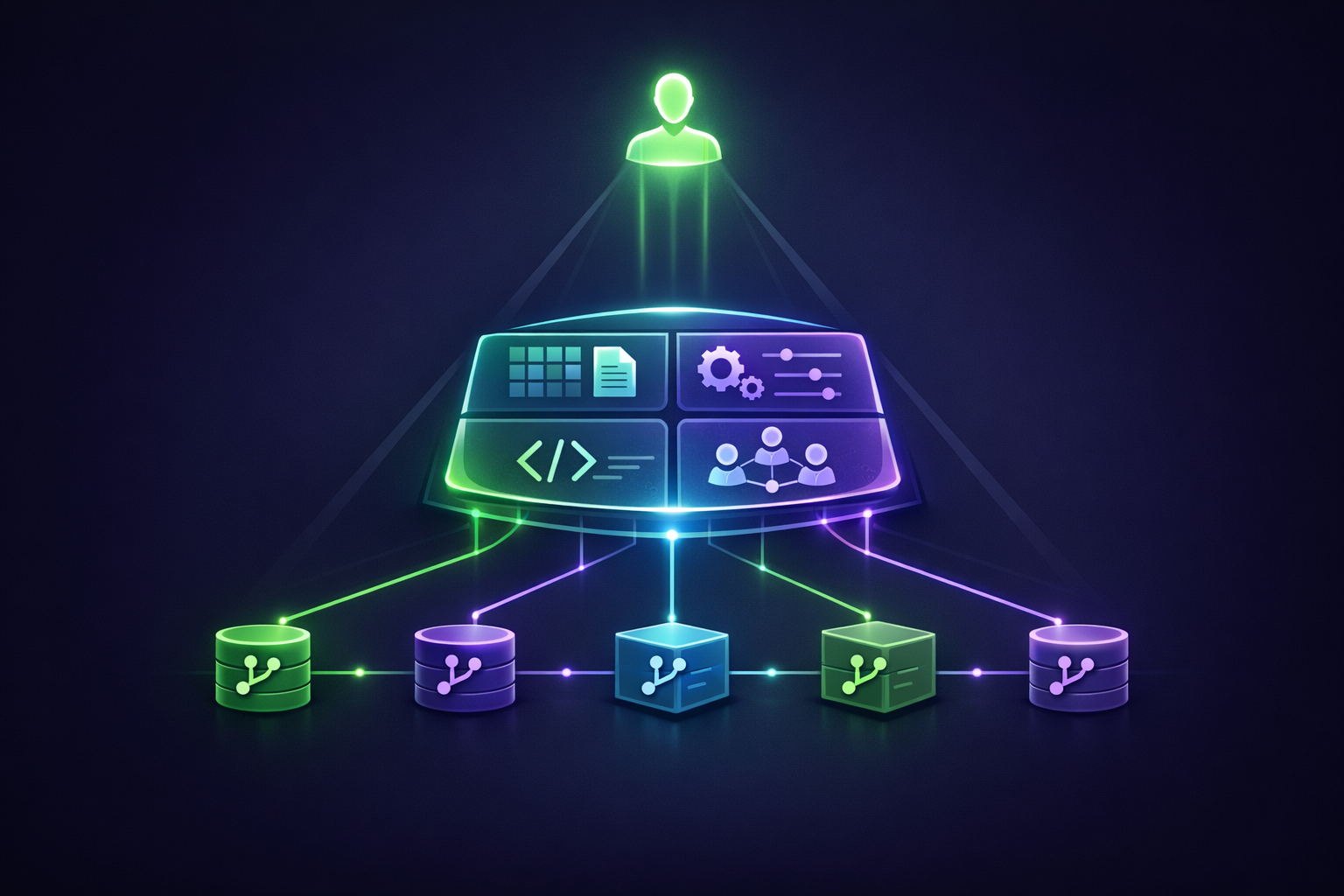
The pattern is this: instead of putting your knowledge base inside the project repos, you create a separate private repository that orchestrates everything. This is your cockpit — the command center where you sit, where your AI agent runs, where your knowledge lives, where you orchestrate work across all the project repos.
Let’s say your project is called X. You create a private GitHub repo called x-ctx (X Context). This becomes your folder — your home base for everything related to project X.
Inside the Cockpit
Here’s the structure:
x-ctx/                       # Your private cockpit (GitHub: x-ctx)
  README.md                  # What this cockpit is, how it works
  CLAUDE.md                  # Your rules, conventions, AI workflow
  .env                       # API keys, system credentials (gitignored)
  .claude/                   # Skills, commands, agent definitions
    skills/
    commands/
  docs/                      # Knowledge base (this is the gold)
    ctx.md                   # Or wiki/ for LLM Wiki pattern
    architecture/
    decisions/
    meetings/
  scripts/                   # Automation, tooling, helpers
  repos/                     # Project repos (gitignored!)
    x-frontend/              # cloned from upstream
    x-backend/
    x-mobile/
    x-shared/
Each piece has a purpose:
- CLAUDE.md — your AI workflow rules. Your conventions. Your preferences. Not the team’s. Yours.
- .env — connections to APIs, databases, internal tools. Local-only, never committed.
- .claude/ — Claude Code skills and commands you’ve built. Your agent toolkit, evolved over time.
- docs/ — your knowledge base. Architecture notes. Meeting summaries. Stakeholder context. The deep domain knowledge that makes you effective on this project.
- scripts/ — helper scripts you’ve written. Codegen. Data exports. One-off utilities. The accumulated automation.
- repos/ — the actual project repos, cloned locally and gitignored. They live here so your AI agent can access them all from one root, but they’re not part of the cockpit’s git history.
The repos/ detail is the key trick. By cloning the project repos as subdirectories of your cockpit and gitignoring them, you get the best of both worlds: your AI agent can read and modify code across all repos from a single working directory, but the cockpit itself only commits your stuff — not the project code.
The Pyramid
Think of the structure as a pyramid:
- At the top: you. The human. The orchestrator. The decision-maker.
- In the middle: the cockpit. Your knowledge base, your AI agents, your scripts, your conventions. The amplification layer.
- At the bottom: the project repos. The actual code that ships. Multiple repos, possibly maintained by multiple people.
You sit at the top. You issue intent. The cockpit — powered by your knowledge base and AI agents — translates that intent into actions across the project repos at the bottom. Code gets written, commits get made, PRs get opened. But the orchestration layer stays yours.
It’s a leverage structure. You operate one level up from the code. You manage the agents that manage the code.
The Benefits
Why does this pattern work so well? Several reasons — each one a real pain point in collaborative AI-native engineering.
1. Privacy by Default
Your knowledge base is private. Yours alone. It can contain things that don’t belong in a shared repo:
- Personal observations about the codebase or team dynamics
- Sensitive notes from stakeholder conversations
- Strong opinions you don’t want to fight about in PR reviews
- Half-formed ideas that aren’t ready for public consumption
- Notes about people — who knows what, who decides what, who blocks what
This kind of context is essential for effective work, but it cannot live in a shared repository. The cockpit gives it a home.
2. Diverse Points of View
Every engineer on the team has their own cockpit. Their own knowledge base. Their own perspective on the project.
This sounds inefficient, but it’s actually a strength. Different POVs are valuable. If someone’s knowledge base is biased or incomplete, it doesn’t corrupt yours. If you and a colleague disagree about an architectural decision, you each capture your reasoning in your own context, and the conversation continues at the code level where it belongs.
A single shared knowledge base is like a single source of truth — it sounds good until you realize the truth is contested. Multiple cockpits let multiple truths coexist productively.
3. Separation of Concerns
Code work and knowledge work are different. They have different rhythms, different review processes, different stakes.
- Code needs review, testing, CI/CD, careful merging. It’s public. Other people depend on it.
- Knowledge is fluid, exploratory, iterative. You add a note, you change your mind, you delete it, you rewrite it. It’s private. Only you depend on it.
Forcing knowledge work through code review processes is friction. You don’t want to open a PR to update your meeting notes. You don’t want a colleague’s comment on your half-formed observation about the database schema. The cockpit lets each kind of work move at its own speed.
4. Tool Independence
You use Claude Code with QMD and the LLM Wiki pattern. Your colleague uses Cursor with their own approach. Another colleague uses raw GPT with no knowledge base at all.
With the cockpit pattern, none of this conflicts. Each person’s tooling lives in their own cockpit. The shared project repos stay clean — just code, just CI, just the things everyone agrees on.
This is essential for real teams. You can’t standardize AI tooling across engineers — the field is moving too fast, and people have legitimately different preferences. The cockpit pattern lets everyone use what works best for them without imposing on anyone else.
5. No PR Overhead for Knowledge
This is the practical win. When you learn something important from a meeting and want to add it to your knowledge base:
- Without cockpit: open the project repo, find the right branch, edit the docs, create a PR, wait for review, merge
- With cockpit: tell Claude to update the wiki. Done.
The friction collapses. You actually update your knowledge base because it’s effortless.
6. Agent Memory Persists
Your .claude/ directory — with skills, commands, agent definitions — lives in the cockpit and gets versioned. As you build agent capabilities for this project, they accumulate in one place. Your agent gets smarter about this specific project over time, and that intelligence travels with the cockpit.
How to Set It Up
Step 1: Create the Private Repo
# On GitHub: create a new private repo named x-ctx
git clone git@github.com:yourname/x-ctx.git
cd x-ctx
Step 2: Build the Structure
mkdir -p docs scripts .claude/skills .claude/commands repos
touch README.md CLAUDE.md .env .gitignore
Step 3: Configure .gitignore
This is critical. The repos/ directory must be gitignored — you don’t want to commit other people’s code into your private cockpit:
# .gitignore
.env
repos/
*.log
node_modules/
.DS_Store
Step 4: Clone the Project Repos
cd repos
git clone git@github.com:company/x-frontend.git
git clone git@github.com:company/x-backend.git
git clone git@github.com:company/x-mobile.git
cd ..
Each cloned repo retains its own git history and remotes. You can pull, branch, commit, and push to them normally — they’re just nested inside your cockpit folder for convenience.
Step 5: Configure CLAUDE.md
Tell your AI agent how to navigate the cockpit:
# CLAUDE.md

## Project: X
This is the cockpit for project X.

## Structure
- `docs/` — my knowledge base for this project
- `repos/` — cloned project repos (gitignored)
  - `x-frontend/` — React frontend
  - `x-backend/` — Node.js API
  - `x-mobile/` — iOS app
- `scripts/` — helper scripts and automation
- `.claude/` — my custom skills and commands

## Workflow
When working on a feature that spans multiple repos:
1. Read relevant context from `docs/`
2. Make changes in `repos/x-frontend/` and `repos/x-backend/` as needed
3. Open separate PRs in each repo
4. Update `docs/` with any new knowledge learned

## Knowledge Base
Knowledge about the project lives in `docs/`. Update it whenever you learn
something important. Never commit knowledge files to the project repos themselves.
Step 6: Start the Agent in the Cockpit
cd ~/Projects/x-ctx
claude
Claude Code starts in the cockpit root. From here, it has access to your knowledge base, your scripts, your skills, and all the project repos under repos/. It can read and modify code across multiple repos from a single session, while keeping your private context separate from the shared codebase.
Combining With Everything Else
The cockpit pattern composes naturally with everything I’ve written about in this knowledge management series:
- The Knowledge Equation — the cockpit is where your domain knowledge accumulates. The pattern protects it, organizes it, makes it searchable.
- The Context Wall — when your cockpit’s
docs/outgrows a single file, add QMD inside the cockpit. Indexdocs/**/*.mdand search semantically. - The Knowledge Base That Builds Itself — use the LLM Wiki pattern inside your cockpit. Raw sources go in
docs/raw/, LLM-maintained wiki goes indocs/wiki/.
The cockpit is the container. The patterns inside it are the contents. Together, they form a complete knowledge management system that works for solo and collaborative projects alike.
When NOT to Use This
The cockpit pattern is overkill for some situations:
- Solo projects in a single repo: just keep everything in the project repo. The cockpit adds complexity for zero benefit.
- Small projects with a small team: if everyone is fine sharing knowledge in a single project repo, that’s simpler. Adopt the cockpit only when the friction becomes real.
- Open-source projects: the project repo is the right home for shared knowledge. Your private cockpit might still be useful for personal notes, but the project repo serves the broader community.
- Quick experiments: not every project needs a cockpit. For throwaway experiments, just create a folder, write some code, move on.
The right time to adopt the cockpit pattern is when you feel the friction — when you find yourself wanting to keep notes that don’t belong in the shared repo, when you’re working across multiple repos and tired of context-switching, when your AI tooling preferences are diverging from the team’s.
Start simple. Add the cockpit when simple isn’t enough.
The Bigger Picture
What the cockpit pattern really represents is a shift in how we think about engineering work. The traditional model: you’re an engineer who works inside a project repo. The repo is the unit of work. Everything you do is scoped to the repo.
The AI-native model: you’re an orchestrator who works across multiple repos through an intelligent layer. The unit of work is the project, which may span many repos. Your tools, your context, your conventions live in a layer above the code.
As I argued in The Knowledge Equation, the most valuable engineers in the AI age are those who combine deep domain knowledge with mastery of AI orchestration. The cockpit pattern is the structural manifestation of that idea — a place where your knowledge and your orchestration tools live together, separate from but connected to the code that ships.
It’s a small change in how you organize files. It’s a large change in how you work.
Related Reading
- The Knowledge Base That Builds Itself — Let your AI maintain the knowledge inside your cockpit
- The Context Wall — When your cockpit’s knowledge base outgrows a single file
- The Knowledge Equation — Why domain knowledge is the real AI differentiator
- The Architect's Protocol — The complete AI-native development workflow