Grok Bot Is a Computer That Stays On
Named teammates on a persistent cloud computer. SuperGrok Heavy includes it. How it works, what it costs, and what to hire it for.

Grok Bot is a named teammate with a job and a computer that stays on after you close the laptop.
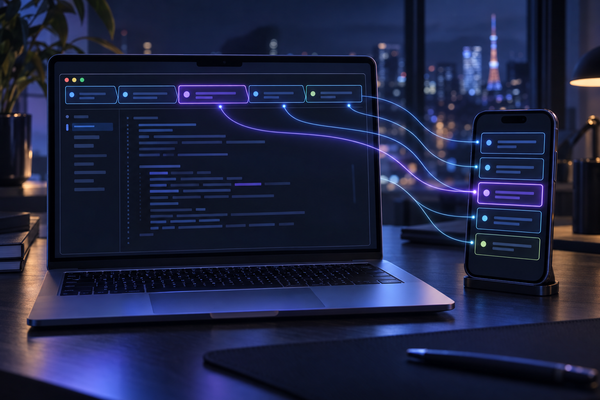
You message it. It works in a browser, a filesystem, and a terminal on a persistent cloud PC. It updates the thread. It stops when something needs you — send, publish, buy, production, a password, a CAPTCHA. Official: docs.x.ai/grok-bot. Beta since 11 August 2026. Checked 17 September 2026.
It is not the Grok chat window, and it is not Grok Build in the terminal. Those are other products. This piece is the Bot.
What. Named Bots with jobs. They share one persistent cloud computer (browser, files, terminal), US-hosted. Work continues when the laptop is shut. Isolation is between users, not between your Bots.
How. Desktop or phone app. Sign in with Cursor. Create a Bot, give it a first task, take over the computer for logins, save a skill, then a routine. Cursor picks the model. There is no picker.
Price. No standalone SKU. SuperGrok Heavy includes it (weekly usage; extra billed as tokens). Heavy and Plus: yes. SuperGrok: confirm live. Cursor Pro+ / Ultra and Teams Standard / Premium: yes. Other Cursor seats: confirm live. Matrix: Plans and billing.
What to hire it for. Repeatable research and drafts that finish in real tools — then approval before anything leaves. Watchers and scheduled digests are the shape of the VM. Not a local coding session.
The computer
The load-bearing fact is not the chat UI. It is the machine. Browser, disk, terminal, in Cursor's cloud. Connectors where they exist; computer-use (click, type, navigate) for everything else.
All Bots on one user share one computer. Cookies, files, CLI credentials, signed-in sessions. Handoffs work because there is nothing to copy. The docs say twice: do not treat separate Bots as a security boundary. Isolation is a Firecracker microVM between users, not between your Sales Bot and your Expense Bot.
Each Bot gets its own screen on that machine. One computer-use task per screen at a time. Several Bots can still reason, use files, and talk to each other in parallel. The computer is assigned to the account, not to a Bot. On-prem and bring-your-own-image are not offered. Computers run in the United States today. That is not Cursor's US-only data-residency program.
Cursor authenticates. Cursor picks the model. Legacy Privacy Mode is not supported — Grok Bot requires cloud data storage. Training opt-out follows the Cursor account.
How you actually run it
Download from x.ai/bot. Desktop: macOS Intel and Apple silicon, Windows x64 and Arm64, Linux .deb / .rpm / AppImage. Phone: iOS 18+, Android 9+. iPad is not supported at launch. Sign in with Cursor (SSO if the org requires it). First run sets up the shared computer in the background, then Meet a future teammate.
Create a Bot with a short name, one primary job, and a description of how it should work. Focused Bots beat a catch-all. Example from the docs: Piper, product performance, investigate with observability tools, preserve links and screenshots, never change production.
A first task needs five things: outcome, sources, constraints, deliverable, review point. Start with something that cannot send mail. Then a task in a real tool. When the Bot hits a login, open Agent Computer, take over, type the password or 2FA yourself, return control. The session sticks on the shared machine, so other Bots can reuse it. Connectors live under Settings → Plugins.
Ask it to name lasting preferences in the thread. When the process is stable, save a skill, test it on a second input, then a routine. A public share link copies the configuration — not the computer, not logins, not history. Strip secrets before you share. Deleting a Bot removes its profile, conversation, and routines; files and logins on the shared computer can remain.
Price — including SuperGrok Heavy
There is no Grok Bot SKU. Access is a benefit of a plan. SuperGrok Heavy includes it. Weekly included usage; when that grant runs out, extra can continue as on-demand usage billed from model and token cost through Cursor. If you have both a Cursor seat and SuperGrok, Grok Bot uses whichever has more usage. Usage is metered on the Cursor account even when SuperGrok is the grant.
Live matrix: Plans and billing. FAQ eligible list: SuperGrok Plus, SuperGrok Heavy, Cursor Pro+, Cursor Ultra, Cursor Teams Standard and Premium. Mobile docs match that list and omit plain SuperGrok. The overview still says you can link SuperGrok, SuperGrok Plus, or SuperGrok Heavy. I am not going to flatten that into a $30 yes. Confirm the screen in the app.
Eligible plans include access and an allowance; optional on-demand usage can incur additional charges billed through Cursor. Heavy's commonly listed consumer price is about $300 per month. Confirm the current plan and on-demand settings before enabling additional usage.
What it is for
xAI's use-case page is honest in a way launch pages usually are not: start with read-and-prepare work, review, then maybe a routine. Every starter prompt ends with do not send, do not enroll, do not change production.
That is the product. Not an agent that "lives in Gmail." A computer that can open Gmail if you signed that computer into Gmail, plus a Bot whose job is the digest.
Week five of public beta. Official roles above are the playbook. Public write-ups are thin. Do not treat scattered demos as a usage study. A one-off computer-use stunt is not a reason to buy Heavy. Sites block automation. Sessions expire. CAPTCHAs hand the desktop back to you.
Limits
Shared computer means shared sessions. A Bot that can see the CRM can see whatever else is logged in on that VM. Give a high-risk job its own Cursor user if you need a wall.
Local execution — commands on the machine in front of you — is a separate switch, per-command approval by default. Keep it off unless the task needs that machine.
A Bot should not bypass a login wall. The docs say it hands 2FA and CAPTCHA to you. If a write-up claims otherwise, that is not the product as specified.
Grok Build is the terminal agent on a local repo. If the work is a pull request, that is the other product. Bot is for apps and sites, including tools with no API, and for work that should continue with the lid shut.
What to do with it
If you are not on Heavy, Plus, Cursor Pro+ / Ultra, or Teams Standard / Premium, this is not a cheap add-on. Confirm the matrix before you upgrade for Bot alone.
If you already pay Heavy: install the app, create one Bot, give it a job with a finish line and a "do not send" line. Review. Then a skill. Then a routine. Do not start with eight Bots in a group chat. The computer is shared; the failure mode is one login too many, not too few teammates.
The interesting layer is a computer that stays on. Hire it for watchers and drafts that have to finish in real tools. Keep consequential actions behind approval.
Overview · FAQ · Get started · Use cases · Computer and apps · Security FAQ · Plans and billing · x.ai/bot.
SuperGrok Heavy ~$300/mo is the commonly published consumer max; confirm at x.ai.