Codex Mobile
OpenAI shipped Codex inside the ChatGPT mobile app. Not a mobile IDE — a remote control surface for agent work on cloud sandboxes and connected hosts. The execution boundary is the product.
OpenAI shipped Codex inside the ChatGPT mobile app on May 14, 2026, in preview on iOS and Android. The product is simple in the right way: Codex keeps working on a real execution environment, and the phone becomes the place where you supervise it.
That distinction matters. This is not a mobile IDE. It is not a tiny terminal. It is not a file browser pretending that editing TypeScript on a glass keyboard is a good idea.
Codex Mobile is a remote control surface for agent work.
The important architecture question is not “can I code on my phone?” It is what execution boundary you are approving from your phone.
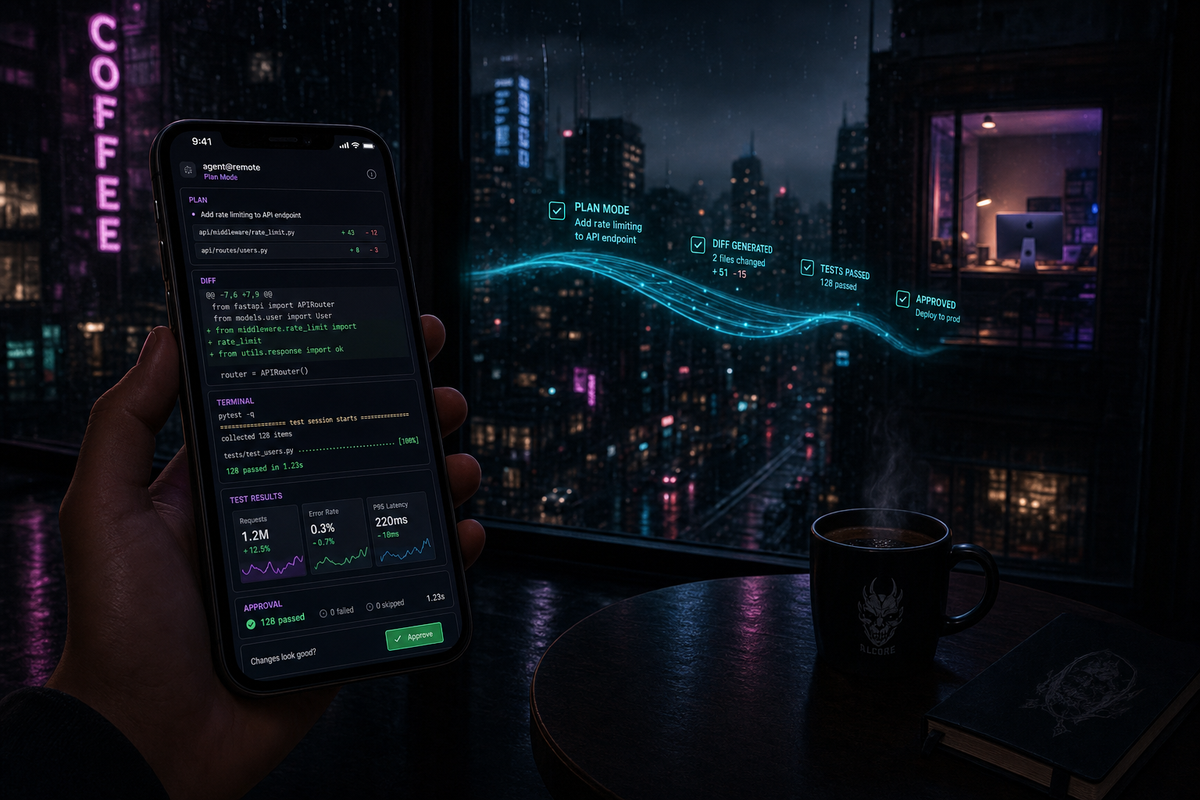
Codex now gives OpenAI users a mobile cockpit for long-running agent work. Start threads, continue threads, approve actions, review diffs, inspect screenshots, watch terminal output, and move across active hosts.
There are two Codex shapes to keep separate. Codex cloud (isolated cloud sandboxes, scoped delegation). Codex remote access (the phone controls Codex against a connected Mac, Mac mini, SSH host, or managed devbox).
The useful comparison to Claude Code Remote is narrow. Trust model, host operating system support, and setup flow. Everything else is product noise.
Mobile setup is QR-code-first, host-app-first. Today the pairing path is Codex on macOS; OpenAI says Windows phone-to-app support is coming soon. The host has to stay awake, online, and running Codex.
The mature workflow is route-by-execution-boundary. Cloud sandboxes for scoped disposable work. Connected hosts when local state matters. Mobile for supervision, not for deep architectural judgment.
What Codex Mobile actually is
OpenAI's launch post describes the shape clearly: Codex can run across laptops, devboxes, or remote environments, while the mobile app loads live state from wherever Codex is operating. The phone can see project context, approvals, plugins, screenshots, terminal output, diffs, and test results.
That is the product.
From the phone you can:
- Start new Codex threads when an idea or bug is fresh.
- Continue active threads without going back to the desktop.
- Answer questions when Codex reaches a fork.
- Approve or reject actions from the safe-by-default permission flow.
- Review diffs, screenshots, terminal output, and test results as the run progresses.
- Move across connected hosts instead of being pinned to one machine.
- Keep multiple long-running tasks alive while you are away from the keyboard.
The setup flow is intentionally consumer-grade. Update the ChatGPT mobile app. Update the Codex app on macOS. Start the pairing flow from the host. Scan a QR code. The host has to stay awake, online, and running Codex for remote access to continue.
That last sentence is the architecture hiding inside the UX. The phone is not doing the work. The phone is holding the operator loop open.
The comparison that actually matters
Most comparisons between coding agents get boring fast because they collapse into model religion. That is not the useful lens here.
For Codex Mobile, the useful comparison to Claude Code Remote is not "which mobile UI is nicer?" It is "where does the agent execute, and what does that imply?"
That is enough comparison. The products are not interchangeable, and they do not need to be.
The execution boundary is the product
Codex Mobile forces the right question: where is the work actually happening?
There are two different Codex shapes that operators should keep separate.
First, there is Codex cloud: background work in isolated cloud environments. The agent gets a task, a repo, a provisioned environment, and a bounded place to operate. The point is delegation with a managed blast radius.
Second, there is Codex remote access: the phone controls Codex running against a connected environment. That might be the Mac on your desk. It might be a Mac mini. It might be a remote SSH host or managed devbox reachable through the Codex app. In this mode, the phone is a relay into a live working environment.
Same mobile app. Different execution boundary. That difference decides almost everything.
A cloud sandbox is excellent when you want isolation. A runaway command cannot wander into unrelated projects. It cannot read your local keychain. It cannot accidentally mutate the weird folder you keep around because a production script still depends on it. The task starts from a cleaner, more reproducible base.
That is not a small advantage. A lot of agent work should be disposable. "Add a test for this edge case." "Investigate this failing branch." "Try a patch and show me the diff." "Review this migration." Those are good sandbox jobs.
But isolation has a cost.
Your actual development machine contains state that is hard to reconstruct: local databases, Docker volumes, private certificates, VPN routing, internal hostnames, ~/.ssh/config, repo-specific scripts, .env files, uncommitted scratch work, browser sessions, and the accumulated mess of a project that has survived contact with reality.
A clean sandbox does not know those things unless you teach it, sync it, mount it, or fake it. That is the trade.
Codex has made the useful bet of supporting both shapes: cloud work for scoped delegation, connected-host work for live environments. Codex Mobile sits above that distinction. It does not erase it.
What cloud sandboxes give you
Cloud sandboxes give you bounded execution.
That sounds boring until you have watched an agent misread a path and attempt to "clean up" the wrong directory. The sandbox is not just infrastructure. It is a policy decision. It says this task gets a room, not the whole house.
You also get better reproducibility. Every run can begin from a known environment instead of inheriting yesterday's broken node_modules, a half-applied migration, or the one local package you forgot was globally installed. For CI-shaped work, that is a feature.
You get cleaner delegation. The operator does not need to keep a laptop awake just because an agent is grinding through tests for twenty minutes. Work can continue away from the machine that initiated it.
You get a better enterprise story. Cloud environments and managed workspaces give administrators something to reason about: policy, logging, access, retention, scoped credentials, and compliance posture. OpenAI's release also calls out HIPAA-compliant Codex use for eligible Enterprise workspaces in local environments, which is the correct level of specificity. Compliance is never a vibe. It is configuration, eligibility, controls, and auditability.
The price is environment truth. If the bug only reproduces on your machine because of your VPN, your local Postgres state, your docker-compose.yml, your real .env, or your company's odd internal DNS, the sandbox is no longer the truth. It is a useful approximation.
Approximation is fine for many tasks. It is deadly for some.
What connected hosts give you
Connected-host execution gives you the real machine.
That means the agent can inspect the actual project state, run the actual scripts, hit the actual local services, and use the same strange dependencies the human operator uses. If your app only behaves correctly after three terminals are open and one ancient Redis container is running, the connected host is the environment that knows that.
This is why local-first tools remain useful even as cloud agents improve. Local state is not an implementation detail. In many mature codebases, local state is the work.
The risk is also obvious. When the agent runs with access to the real filesystem, mistakes have real consequences. A bad command can touch real files. A sloppy approval can mutate local state. A tool with access to secrets can leak secrets if the operator is careless.
This is where mobile approval becomes serious. The phone is not just a convenience layer. It is the policy checkpoint. If the operator starts approving commands while distracted, the trust model collapses.
Codex Mobile makes this easier to manage, but it does not remove the responsibility. The phone can show you a diff. It cannot make the judgment for you.
Why mobile-as-control-surface is the right shape
The first reaction to "coding agent on mobile" is usually wrong because people imagine typing code on a phone. That is not the job. The job is supervision.
Long-running agent tasks are mostly wall-clock time interrupted by decision points. Codex investigates, edits, runs tests, gets blocked, asks for permission, finds two possible approaches, needs clarification, or presents a diff. The human does not need to sit at a desk for all of that. The human needs to be reachable at the moments where judgment changes the trajectory.
That is a mobile-native workflow.
Approvals are taps. Rejections are taps plus a sentence. Direction changes are short prompts. Diff review is not as good on a phone as on a monitor, but it is often good enough to decide whether work should continue or stop.
The more interesting part is multi-thread management. Codex is not only a single-agent experience. The Codex app is built around managing multiple agents in parallel, and mobile extends that operating model away from the desk. You can have one thread investigating a test failure, one drafting a refactor, and one checking a dependency upgrade. The phone becomes the interrupt queue.
That is the right abstraction: mobile as cockpit, host as execution layer, human as policy layer.
What Codex Mobile does not do
Codex Mobile should be judged by the job it is trying to do, but the preview still has limits that matter.
It is not a full IDE. There is no serious file-tree editing workflow, no sustained syntax editing, no real multi-window environment, and no reason to pretend otherwise. That is a correct product choice. It is still a limit.
It is not CLI parity. The mobile app is not where you tune every flag, run every slash command, or manage every configuration detail. Deep setup still belongs on the host.
It is not universal host support yet. The phone-to-Codex-app pairing path is macOS first. OpenAI's release notes say Windows support for connecting the phone to the Codex app is coming soon. That distinction matters because the Codex desktop app already has broader platform movement, but the mobile remote-access path is not equally mature across hosts yet.
It also does not remove the need for review. A beautiful mobile approval UI does not make a risky database migration safe. It just makes the approval reachable.
Five implications
1. The phone is now part of the agent runtime loop. Not because engineers want to code on phones, but because long-running agents need low-friction human interrupts.
2. Codex's real product shape is multi-boundary. Cloud sandbox, connected host, remote SSH environment, managed devbox. The mobile app is the control plane above those boundaries.
3. QR-code setup is not cosmetic. It tells you who OpenAI is designing for: developers who already have a desktop Codex environment and want mobile continuity without SSH tunnels, port forwarding, or a custom remote-access ritual.
4. Cloud safety and local truth will keep pulling against each other. Sandboxes are safer and cleaner. Local hosts are more truthful and more dangerous. Serious teams will use both.
5. Mobile approval will become table stakes for coding agents. Once agent tasks run for real wall-clock time, requiring the operator to sit at the initiating machine becomes a throughput bug.
Route tasks by execution boundary
The mature workflow is not choosing one vendor and pretending every task has the same shape. The mature workflow is routing by execution boundary.
Use Codex cloud when the task is scoped, reviewable, and disposable. Small features, tests, branch review, documentation updates, isolated bug investigation, dependency experiments. The sandbox is a feature. Let the agent work in a bounded room and hand back evidence.
Use Codex Mobile over a connected host when the environment matters but you do not need to be physically present. Local services, repo scripts, browser output, terminal state, screenshots, plugins, and test results can stay attached to the host while you approve and redirect from the phone.
Use Claude Code Remote when the local-first model is the point. If the real source of truth is a machine with specific files, local MCP servers, shell history, credentials, and project state, that trust model is useful. The phone is only a window, but sometimes the window into the real machine is exactly what you want.
Use neither mobile path when the work demands sustained judgment. Security-sensitive merges, production incident response, irreversible migrations, broad architecture changes, and anything involving unclear blast radius should pull you back to a keyboard and a large screen.
The rule is simple: route by where truth lives.
If truth lives in a clean task boundary, use the sandbox. If truth lives on a host, use the host. If truth requires your whole attention, stop pretending the phone is enough.
Closing
Codex Mobile is the right product shape for where coding agents are going.
Not because phones are good development machines. They are not.
Because agent work is becoming longer, more parallel, and more interrupt-driven. The operator does not need a pocket IDE. The operator needs a pocket approval queue, a pocket diff viewer, a pocket terminal observer, and a way to keep work moving without being chained to the original machine.
The architectural question remains the same every time: what does the phone control?
A cloud sandbox. A connected Mac. A remote SSH environment. A managed devbox. A real filesystem with real secrets and real consequences.
That boundary is the product.
Codex Mobile makes the boundary visible. Good operators will route around it.
Grok Build. Same-week companion piece on xAI's terminal coding agent. Different bets, different architecture choices.
Claude Code Remote Control. The local-first mobile control surface. Different trust model from Codex Mobile.
Two Models, One Branch. Running multiple coding agents on the same repo. The simplest multi-model orchestration that works.
Above the Model. The components above the model that decide AI-native output quality. Trust model, verification, control surface — Codex Mobile is one slice.