The Cockpit
A separate workspace can hold personal agent configuration and coordinate several repositories. Keep authoritative team knowledge in approved shared storage and respect each repository’s rules.

Across The Knowledge Equation, The Context Wall, and The Knowledge Base That Builds Itself, I’ve been writing about how to manage your knowledge base — from a single ctx.md file, to QMD-powered search, to LLM-maintained wikis. The progression from manual to automated, from small to scalable.
But there’s a question I’ve been dancing around: where do you actually put it?
This question seems trivial until you try to answer it. Inside the project repo? In its own repo? In a separate folder? Shared with the team? Private? Tracked in git? Ignored?
There are two scenarios, and they have very different answers.
Scenario 1: Solo, Single Repo
This is the easy case. You’re working alone on a project that lives in one git repository. Your code, your knowledge, your AI workflow — all in one place.
The structure is straightforward:
my-project/
  CLAUDE.md              # Rules and conventions
  README.md
  src/                   # The actual code
  docs/
    ctx.md               # Knowledge base (or wiki/ for LLM Wiki pattern)
  scripts/
  .claude/               # Claude Code skills, commands
  .env                   # Local config (gitignored)
Everything lives together. The knowledge base is part of the project. When you commit changes, code and knowledge update together. When you check out a branch, you get the matching version of both. Simple, clean, no friction.
For a single repository with matching access requirements, this may be sufficient. Add another storage layer only for a concrete workflow or access need.
But what if you’re not alone? Or what if your project spans multiple repositories?
Scenario 2: Multi-Repo or Collaborative
This is where things get interesting.
Consider these realities:
- Your project has a frontend repo, a backend repo, a mobile repo, and shared libraries
- You work with other engineers who have their own AI tools, conventions, and preferences
- Your knowledge base contains private notes, personal opinions, sensitive observations
- Some of what you know about the project shouldn’t be in a shared repository
- Your AI workflow doesn’t need to be everyone’s AI workflow
If you try to put your knowledge base inside one of the project repos, you immediately hit problems:
- Which repo? Your knowledge spans the frontend, backend, and mobile — it doesn’t belong to any single one
- PR overhead. Every knowledge update requires a code review, a PR, and a merge. Your team doesn’t want to review your notes
- Visibility. Your private observations become part of the shared codebase — visible to everyone, including clients with repo access
- Conflicting preferences. Your CLAUDE.md fights with your colleague’s CLAUDE.md. Your conventions aren’t their conventions
- Tool lock-in. You force the team to adopt your AI tools, or you abandon yours
A separate workspace can help when personal workflow configuration has a different owner or access boundary from the shared project.
The Cockpit Pattern
The cockpit pattern uses a separate repository for personal workflow configuration, approved working notes and orchestration. Shared decisions and authoritative documentation remain in their approved shared location. A private repository is not automatically an authorized place for organizational data.
Let’s say your project is called X. You create a private GitHub repo called x-ctx (X Context). This becomes your folder — your home base for everything related to project X.
Inside the Cockpit
Here’s the structure:
x-ctx/                       # Your private cockpit (GitHub: x-ctx)
  README.md                  # What this cockpit is, how it works
  CLAUDE.md                  # Your rules, conventions, AI workflow
  .env                       # API keys, system credentials (gitignored)
  .claude/                   # Skills, commands, agent definitions
    skills/
    commands/
  docs/                      # Knowledge base (this is the gold)
    ctx.md                   # Or wiki/ for LLM Wiki pattern
    architecture/
    decisions/
    meetings/
  scripts/                   # Automation, tooling, helpers
  repos/                     # Project repos (gitignored!)
    x-frontend/              # cloned from upstream
    x-backend/
    x-mobile/
    x-shared/
Each piece has a purpose:
- CLAUDE.md — your AI workflow rules. Your conventions. Your preferences. Not the team’s. Yours.
- .env — connections to APIs, databases, internal tools. Local-only, never committed.
- .claude/ — Claude Code skills and commands you’ve built. Your agent toolkit, evolved over time.
- docs/ — your knowledge base. Architecture notes. Meeting summaries. Stakeholder context. The deep domain knowledge that makes you effective on this project.
- scripts/ — helper scripts you’ve written. Codegen. Data exports. One-off utilities. The accumulated automation.
- repos/ — the actual project repos, cloned locally and gitignored. They live here so your AI agent can access them all from one root, but they’re not part of the cockpit’s git history.
Nested checkouts are one way to navigate several repositories from a workspace. Ignoring them prevents ordinary cockpit commits from including those paths; it does not override their repository policies or prevent forced addition. Check the repository root before every Git mutation.
The Pyramid
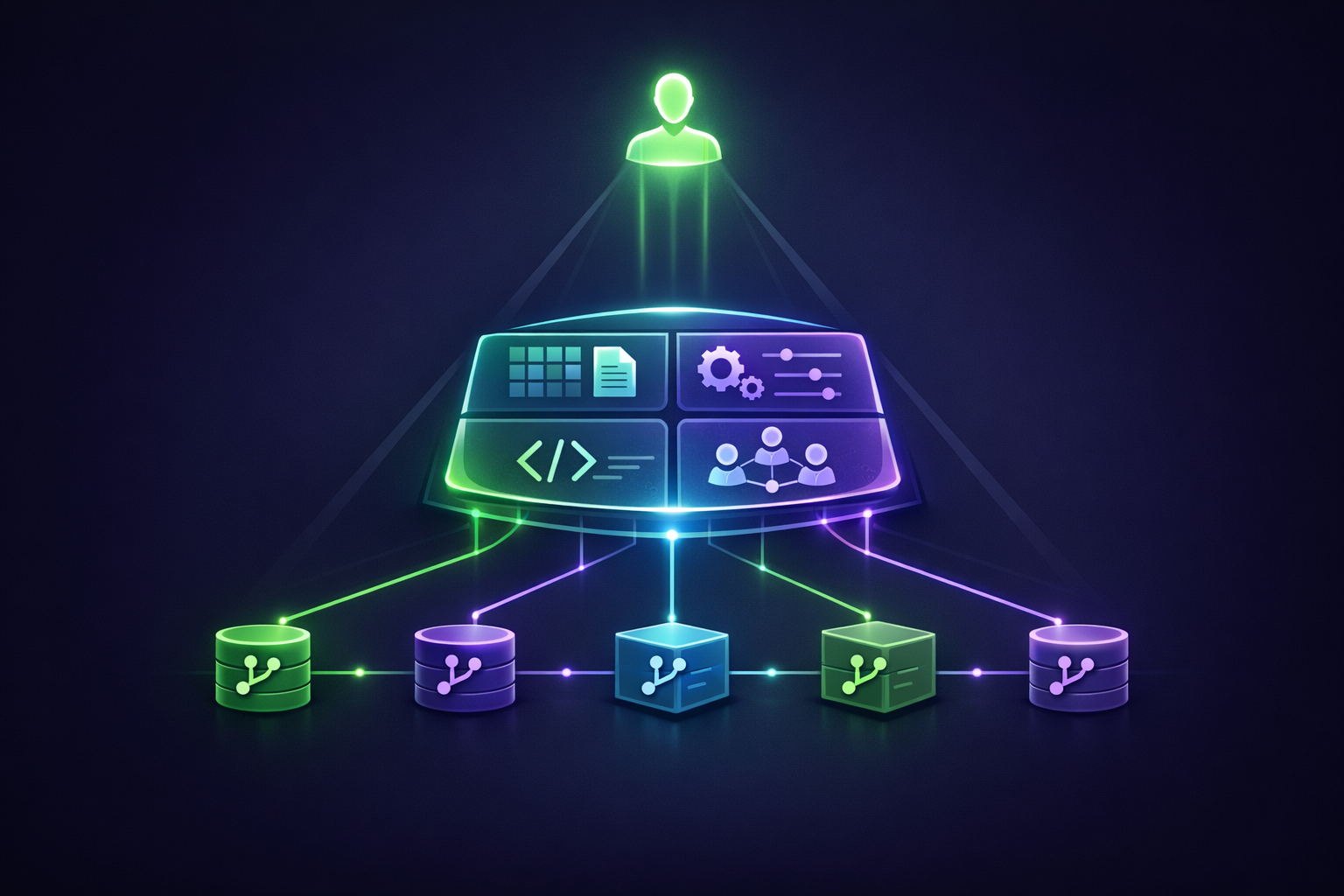
Think of the structure as a pyramid:
- At the top: you. The human. The orchestrator. The decision-maker.
- In the middle: the cockpit. Your knowledge base, your AI agents, your scripts, your conventions. The amplification layer.
- At the bottom: the project repos. The actual code that ships. Multiple repos, possibly maintained by multiple people.
You sit at the top. You issue intent. The cockpit — powered by your knowledge base and AI agents — translates that intent into actions across the project repos at the bottom. Code gets written, commits get made, PRs get opened. But the orchestration layer stays yours.
It’s a leverage structure. You operate one level up from the code. You manage the agents that manage the code.
The Benefits
Why does this pattern work so well? Several reasons — each one a real pain point in collaborative AI-native engineering.
1. Privacy by Default
A cockpit can keep personal tool settings and preliminary technical notes separate from shared project history. Its contents still need an appropriate audience and storage policy.
- Personal tool configuration and reusable local workflows
- Tentative technical questions that do not contain restricted information
- References to authoritative shared documents rather than uncontrolled copies
- Reviewed notes that the organization permits in this storage location
Avoid collecting unnecessary personal profiles or sensitive stakeholder material. Record decisions and facts where the people who depend on them can access the approved source.
2. Diverse Points of View
Every engineer on the team has their own cockpit. Their own knowledge base. Their own perspective on the project.
Individual working notes can preserve alternative hypotheses. Resolve decisions that affect the team in shared records so that engineers do not implement incompatible assumptions.
Different views are useful inputs to discussion. They should not create competing authoritative versions of a contract, access policy or architectural decision.
3. Separation of Concerns
Code work and knowledge work are different. They have different rhythms, different review processes, different stakes.
- Personal workflow notes can evolve under their owner’s process, within data-handling rules.
- Shared architecture, requirements and decision records need appropriate review and access for the people who rely on them.
- Code and documentation can both require versioning, tests and review; the content’s purpose determines the process.
Choose the review process according to the record’s role. A provisional private question and a shared API contract need different treatment. The cockpit should not hide knowledge that teammates need to operate the system.
4. Tool Independence
You use Claude Code with QMD and the LLM Wiki pattern. Your colleague uses Cursor with their own approach. Another colleague uses raw GPT with no knowledge base at all.
Personal tooling can remain separate while shared repositories retain agreed project instructions, documentation and automation. Read and follow those repository rules before acting in a nested checkout.
Teams can standardize tools when that serves collaboration, support or security needs. The cockpit is an organizational option, not a claim that shared tooling is impossible.
5. Appropriate review for each record
An update to a personal workflow note can be lightweight. A new project requirement or decision should follow the team’s approved record and review process.
- Working note: save a tentative observation in an approved personal workspace.
- Shared decision: update the authoritative document, with the required review and links to supporting evidence.
The benefit is clear ownership, not bypassing review that a shared decision requires.
6. Agent configuration persists
Versioned skills, commands and agent definitions preserve configuration. They are not the same as a configured memory store, and they do not establish that the agent learned or loaded a fact. Configure memory separately and verify its read/write location.
How to Set It Up
Step 1: Create the Private Repo
# On GitHub: create a new private repo named x-ctx
git clone git@github.com:yourname/x-ctx.git
cd x-ctx
Step 2: Build the Structure
mkdir -p docs scripts .claude/skills .claude/commands repos
touch README.md CLAUDE.md .env .gitignore
Step 3: Configure .gitignore
This is critical. The repos/ directory must be gitignored — you don’t want to commit other people’s code into your private cockpit:
# .gitignore
.env
repos/
*.log
node_modules/
.DS_Store
Step 4: Clone the Project Repos
cd repos
git clone git@github.com:company/x-frontend.git
git clone git@github.com:company/x-backend.git
git clone git@github.com:company/x-mobile.git
cd ..
Each cloned repo retains its own git history and remotes. You can pull, branch, commit, and push to them normally — they’re just nested inside your cockpit folder for convenience.
Step 5: Configure CLAUDE.md
Tell your AI agent how to navigate the cockpit:
# CLAUDE.md

## Project: X
This is the cockpit for project X.

## Structure
- `docs/` — my knowledge base for this project
- `repos/` — cloned project repos (gitignored)
  - `x-frontend/` — React frontend
  - `x-backend/` — Node.js API
  - `x-mobile/` — iOS app
- `scripts/` — helper scripts and automation
- `.claude/` — my custom skills and commands

## Workflow
When working on a feature that spans multiple repos:
1. Read relevant context from `docs/`
2. Make changes in `repos/x-frontend/` and `repos/x-backend/` as needed
3. Open separate PRs in each repo
4. Update `docs/` with any new knowledge learned

## Knowledge Base
Personal workflow notes live in `docs/` only where approved. Keep authoritative
team knowledge in the project’s approved shared location and link to it. Read
each nested repository’s rules before acting. Do not copy restricted information
into the cockpit or change client repositories for personal harness maintenance.
Step 6: Start the Agent in the Cockpit
cd ~/Projects/x-ctx
claude
Start the agent in the intended workspace and grant only the access required for the task. Nested paths make navigation convenient, but each checkout retains its own authorization, review and publication rules.
Combining With Everything Else
The cockpit pattern composes naturally with everything I’ve written about in this knowledge management series:
- The Knowledge Equation — the cockpit is where your domain knowledge accumulates. The pattern protects it, organizes it, makes it searchable.
- The Context Wall — when your cockpit’s
docs/outgrows a single file, add QMD inside the cockpit. Indexdocs/**/*.mdand search semantically. - The Knowledge Base That Builds Itself — use the LLM Wiki pattern inside your cockpit. Raw sources go in
docs/raw/, LLM-maintained wiki goes indocs/wiki/.
The cockpit is the container. The patterns inside it are the contents. Together, they form a complete knowledge management system that works for solo and collaborative projects alike.
When NOT to Use This
The cockpit pattern is overkill for some situations:
- Solo projects in a single repo: just keep everything in the project repo. The cockpit adds complexity for zero benefit.
- Small projects with a small team: if everyone is fine sharing knowledge in a single project repo, that’s simpler. Adopt the cockpit only when the friction becomes real.
- Open-source projects: the project repo is the right home for shared knowledge. Your private cockpit might still be useful for personal notes, but the project repo serves the broader community.
- Quick experiments: not every project needs a cockpit. For throwaway experiments, just create a folder, write some code, move on.
The right time to adopt the cockpit pattern is when you feel the friction — when you find yourself wanting to keep notes that don’t belong in the shared repo, when you’re working across multiple repos and tired of context-switching, when your AI tooling preferences are diverging from the team’s.
Start simple. Add the cockpit when simple isn’t enough.
The Bigger Picture
What the cockpit pattern really represents is a shift in how we think about engineering work. The traditional model: you’re an engineer who works inside a project repo. The repo is the unit of work. Everything you do is scoped to the repo.
The AI-native model: you’re an orchestrator who works across multiple repos through an intelligent layer. The unit of work is the project, which may span many repos. Your tools, your context, your conventions live in a layer above the code.
As I argued in The Knowledge Equation, the most valuable engineers in the AI age are those who combine deep domain knowledge with mastery of AI orchestration. The cockpit pattern is the structural manifestation of that idea — a place where your knowledge and your orchestration tools live together, separate from but connected to the code that ships.
It’s a small change in how you organize files. It’s a large change in how you work.