
My Mac Is the Cloud
I stopped wanting a cloud devbox. My Mac is the remote workstation now: Tailscale, keys-only SSH, mosh and tmux, Screens for the desktop, and every Claude Code session on both devices under one name, wherever it started.

Every Claude Code session on my Mac was already on my iPhone. I wrote about it two weeks ago: Remote Control on at start, each session named like its iTerm2 tab, archived on the phone when it ends on the Mac. It works, and I use it every day.
It also hits a wall. From the Claude app I could pick up a session that already existed on the Mac. I couldn't start one. And anything that wasn't a Claude chat stayed out of reach: the shell, a GUI app, a browser tab, a dialog waiting for a click.
So this weekend I finished it: real remote access to the whole Mac, three ways in, and sessions I can start from either device. And somewhere in the middle I changed my mind about cloud devboxes.
TL;DR
- Three ways in, two paths. A terminal (Moshi over mosh into tmux) and the full desktop (Screens 5) through a private Tailscale tunnel. Chats through the Claude app, whose Remote Control traffic the Mac sends out to Anthropic's API. SSH takes only my key, and off the tailnet SSH, mosh and Screen Sharing don't answer at all.
- Every session lives in tmux now. My launcher starts each Claude session in its own tmux session. The Mac's iTerm2 tab, Moshi on the phone and the Claude app all show the same session.
- Either device, one name. Start a session on the phone and the Mac opens a tab for it within seconds; start one on the Mac and it shows up on the phone's session bar within a few seconds, one tap away. A rename anywhere follows everywhere.
- The Claude app can start sessions too, through Claude Code's own server mode, one row per project. Those run headless, so for a full terminal session the app asks the Mac to open one.
- My take: a Mac set up for remote access beats a cloud devbox for me. Trade-offs below.
Start here
| 🧭 | The whole Mac from your iPhone, with stock tools. No harness needed for any of this. 1. One private network. Install Tailscale on the Mac and on the iPhone and log in to both with the same account (Google, Apple, Microsoft or GitHub; the first login creates your network on the free plan). In the admin console, disable key expiry for the Mac. 2. SSH with keys only. On the Mac, turn on Remote Login (System Settings → General → Sharing) and set 3. The tools. 4. A terminal on the phone. Install Moshi (or Blink Shell). Create an Ed25519 key in the app, put its public key in 5. Work in tmux. On the Mac: 6. The GUI. Install Screens 5 on the phone, turn on Screen Sharing on the Mac, and connect to the Mac's Tailscale name with your Mac login. Screen Sharing falls under the same caveat as step 2. 7. Keep it awake. On the power adapter, set the Mac never to sleep by itself ( |
Why not a cloud devbox
For a long time I thought the endgame was a development workstation in the cloud. Always on, reachable from anywhere, nothing to babysit. I don't think that anymore.
The machine on my desk is an M4 Max with 128 GB of memory and three displays. A cloud box with that much memory is a monthly bill, and it would still be a box without a screen. My Mac has things a headless devbox doesn't: the GUI, a real browser with my logins, every local tool and app I already use, and the files where they already are.
The usual argument for the cloud is availability. In practice my Mac doesn't sleep: it's on the power adapter, the Amphetamine app keeps it awake, and it sits on 1 Gbps fiber. Reachability was the only missing part, and that's what this weekend fixed.
The costs:
- It's one machine in one place. If it's off, or the power or internet at home goes out, I have nothing. A cloud box doesn't depend on my home.
- Reboots are the weak spot. With FileVault on, a restarted Mac waits at the login screen until someone is at the keyboard (more under Limits).
- Security is on me. A devbox vendor hardens the edge. Here I did it myself, and a review caught that my first plan would have left SSH and Screen Sharing answering on any café Wi-Fi.
For one person with a strong machine and a stable line, I'll take those risks over a monthly bill and a weaker computer. With a modest laptop, a shaky connection, or a team sharing one box, I'd land somewhere else.
How it all fits together
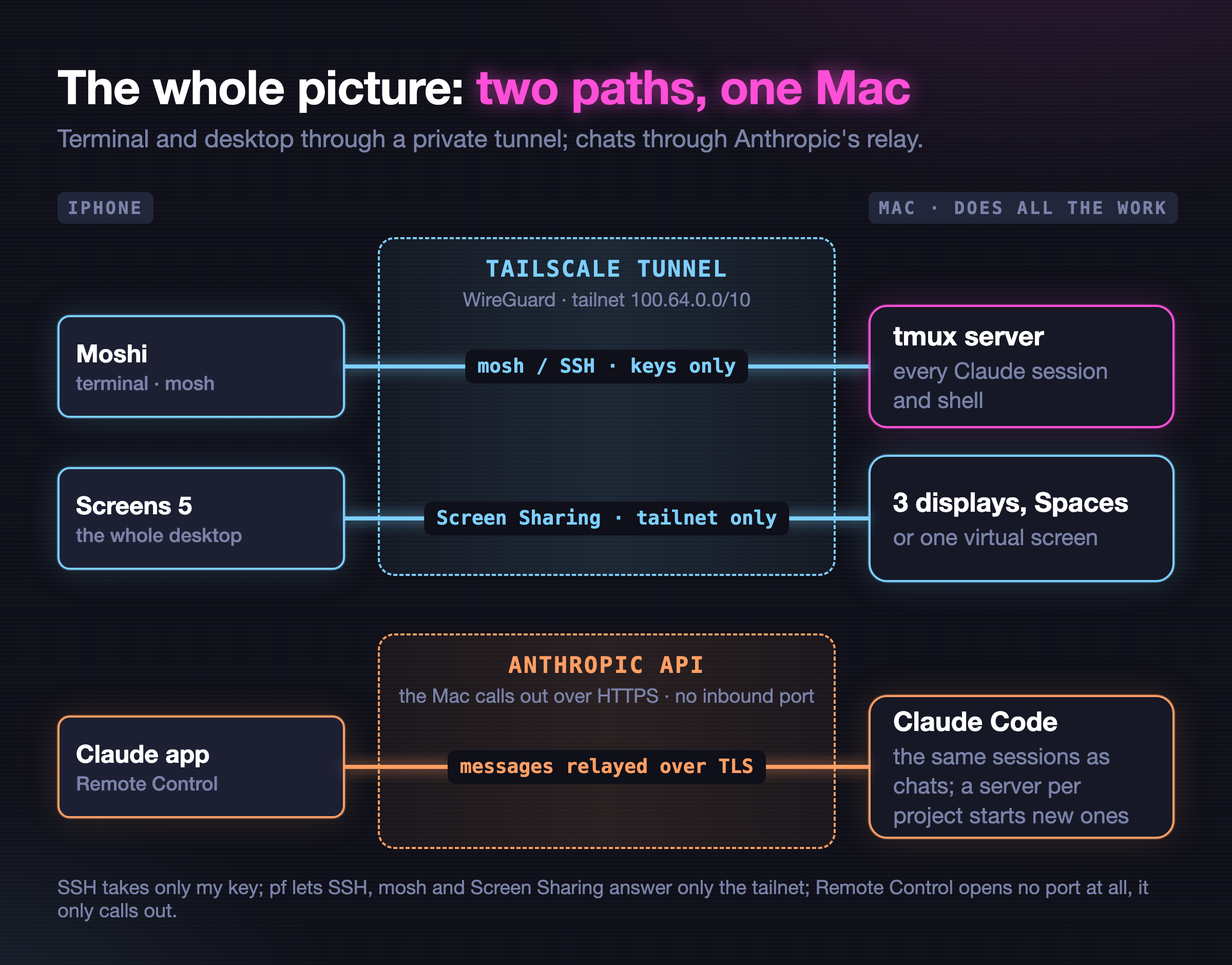
There are two paths from the phone to the Mac, and they work differently.
The private tunnel. Tailscale puts the iPhone and the Mac on one private WireGuard network, a tailnet, where the Mac answers to a short name. The terminal and the desktop use it. Moshi starts a session over SSH, then mosh carries it over UDP inside the same tunnel. Screens talks to macOS's own Screen Sharing. On the Mac, SSH takes only my key, and a firewall lets SSH, mosh and Screen Sharing answer only the tailnet.
The relay. The Claude app doesn't use the tunnel at all. Claude Code's docs are explicit: "Your local Claude Code session makes outbound HTTPS requests only and never opens inbound ports on your machine", and "All traffic travels through the Anthropic API over TLS." The app is a window onto a session that runs on the Mac.
Both paths end in the same place: the Mac does all the work, and every Claude session on it is one tmux session. Three small pieces make that true:
- tmux holds the sessions. One server, started by the Mac's own terminal, one tmux session per Claude session.
- The launcher (
ai) asks its questions, then starts each session inside tmux instead of straight in the terminal. - The watcher, a loop in my harness that runs every 2 to 12 seconds, keeps the screens in step: it opens a Mac tab for any session born elsewhere and carries renames between the tab, tmux and the app.
Three ways in
Here's why each one won.
The network: Tailscale, but not Tailscale SSH. Tailscale can act as the SSH server itself, but only the open-source tailscaled can do that, not the Mac app I run. And mosh can't start through it anyway. Moshi's documentation puts it bluntly: "mosh cannot bootstrap through Tailscale SSH because it is not real OpenSSH". The same page: "Mosh works fine over Tailscale: the SSH bootstrap and the UDP session both ride the tunnel." So the Mac's own OpenSSH, keys only, reached over the tailnet.
The transport: mosh into tmux. mosh keeps a session alive through network switches and sleep, which is exactly what a phone does all day. It only synchronizes the visible screen, so tmux holds the scrollback and, more importantly, the session itself. Use tmux 3.7 or later: Anthropic's terminal docs note that tmux through 3.6 lacked synchronized output. I moved to the stable 3.8.
The terminal app: Moshi. It calls itself "a mobile terminal for long-running coding agents, shells, and tmux sessions on a machine you already control", and it lives up to that: mosh, a tmux session picker, and Pro "reconnects to the host and automatically attaches the same tmux … session". Keys sit in the iOS Keychain behind Face ID. mosh needs Pro: $9.99 a month, $89.99 a year or $199 lifetime on their pricing page. The runner-up was Blink Shell, with native mosh, Secure Enclave keys and the best hardware keyboard support.
I skipped Moshi's host daemon, moshi-hook, which adds push notifications and in-card session switching. It writes its own entries into Claude Code's settings file, updates itself, and sends event summaries to Moshi's server unless you turn on end-to-end encryption. The Claude app already pushes when a session needs me, and the session bar below handles switching.
The GUI: Screens 5. Version 5.10, released on November 10, made Screens, by Edovia's account, the only iPhone app that speaks Apple's High Performance screen sharing: HEVC, sound, and a Retina desktop sized to the phone (Apple specifies 4:4:4 color at 30 or 60 fps). In that mode the Mac's own displays go dark and you work on a new virtual screen. Standard mode shows the real displays instead, one at a time or all together from the Display menu, and a three-finger swipe sends the Spaces shortcut. It connects straight to the Mac's Tailscale name, with no vendor relay, and the Mac side is free. Screens costs $29.99 a year or $249.99 lifetime.
The runner-up was Jump Desktop, cheaper ($14.99 once) with a strong codec. But connecting it straight to a Tailscale address needs its business tier. Parsec has no iPhone client.
The missing piece: starting a session from the phone
Claude Code has an answer of its own: claude remote-control in server mode. Each running server adds its folder to the environment menu on the app's new-session screen. Pick it, type, and a session starts on the Mac in that folder. Since 2.1.325 the server exits with a status a service manager understands, so it can run under launchd.
I run one per project, so every project is a row in the app. But I probed what those sessions are before building on them: headless child processes (claude --print --sdk-url …). They show in the app and in the browser. No terminal can ever show them.
That's fine for a quick question. It isn't what I asked for. I wanted a session I start on the phone to be a real session on the Mac, with a tab I can sit down at later. The only thing that makes one terminal session visible on two devices is a terminal multiplexer. So the answer was tmux, everywhere.
One session, every screen
My launcher, ai, now starts every interactive Claude session in its own tmux session:
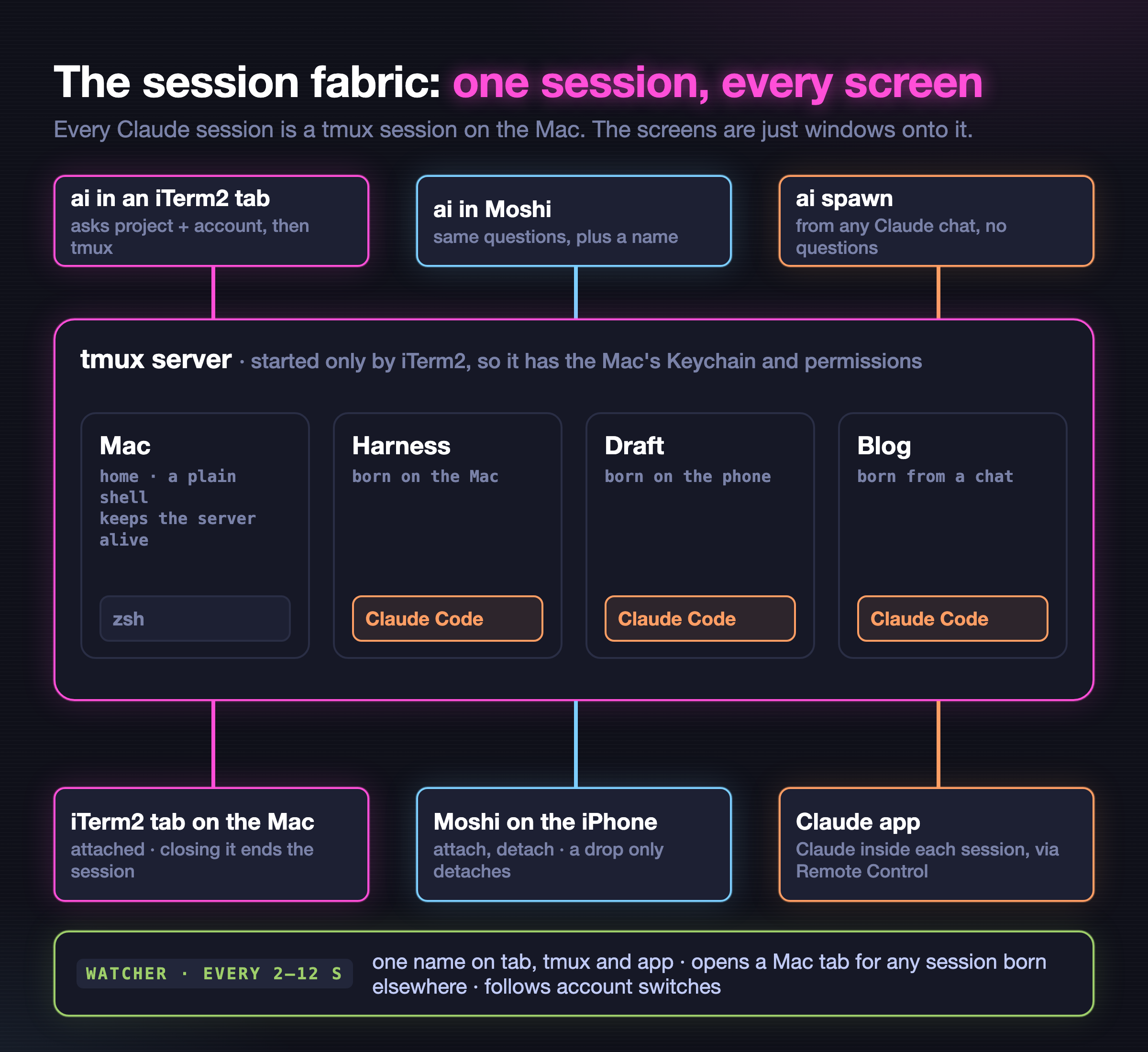
Started on the Mac. ai asks for the project and the account outside tmux, then starts the session in a new tmux session and attaches the tab to it. Plain tmux inside the tab, never iTerm2's tmux integration: Anthropic's docs say fullscreen rendering is incompatible with tmux -CC, and that "Regular tmux inside iTerm2, without -CC, works fine". The tab looks as it did. The title is still Claude Code's own, and there's a one-line session bar at the bottom (more on that below).
Started on the phone. In Moshi, ai lists the running sessions first, when there are any, and offers a new one. It asks for a name (Enter lets Claude Code name it), starts the session in tmux, and within seconds the Mac opens a tab for it. From the Claude app, any session can do the same: "open a session in my blog project called Draft" runs ai spawn, which starts a full session with no questions.
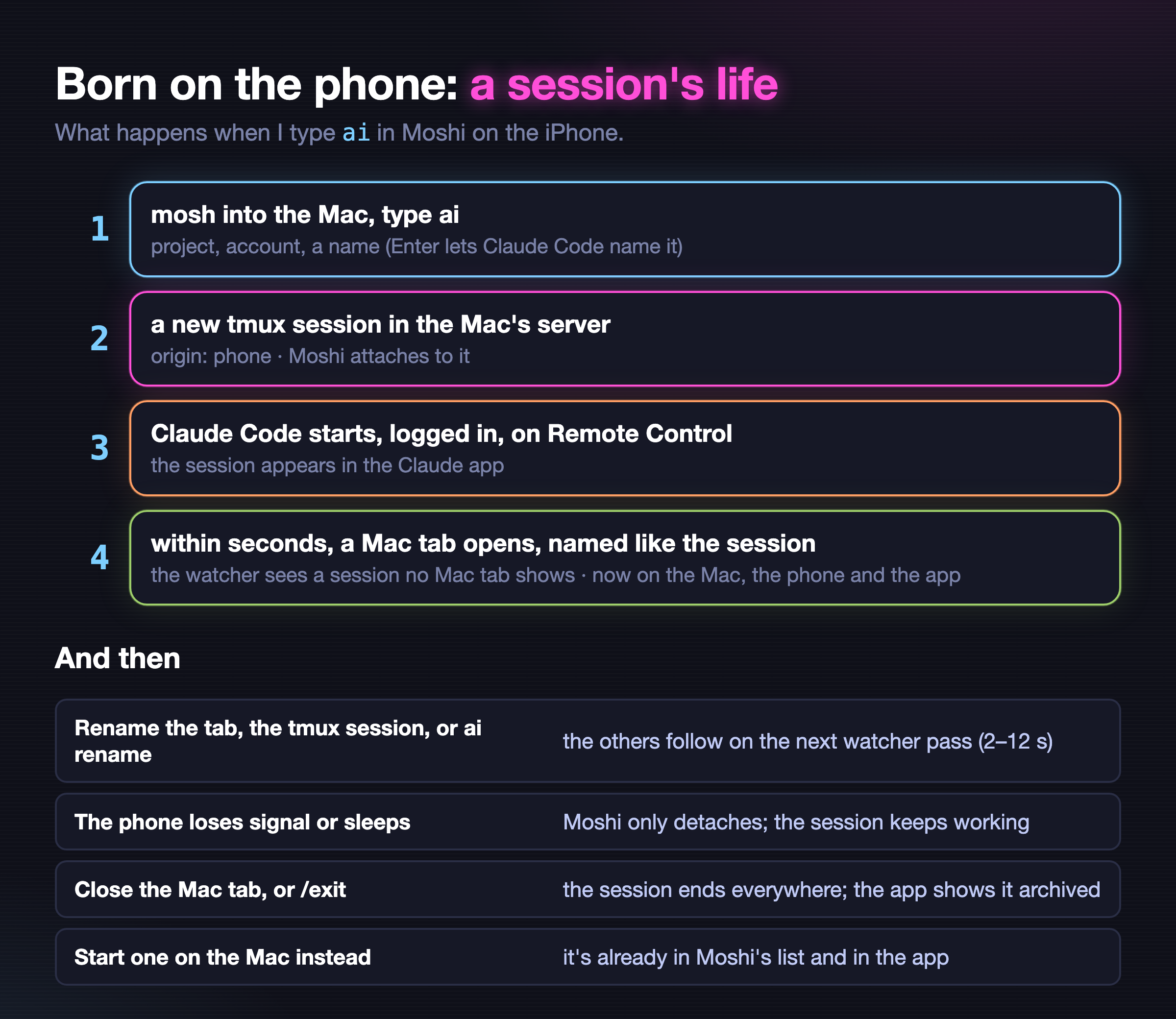
One name everywhere. A name I give is the name in the tab, on the session bar and in the Claude app. I can rename from any of the three surfaces I touch most: double-click the tab, rename the session in Moshi, or ai rename. The others follow within a watcher pass, 2 to 12 seconds. Without a given name, the tmux name follows the name Claude Code gives the session, so the bar and Moshi's list read like the app.
The tab was the hard part. AppleScript can't set an iTerm2 tab's name. iTerm2's own API can, over a local socket with WebSocket framing and protobuf messages, so a small standard-library client does exactly what a double-click does. The watcher remembers its own writes, so it never mistakes them for a rename.
Closing works as before. Closing the Mac tab ends the session everywhere: the tab's process gets a hang-up, kills its tmux session, and Claude Code archives the phone's copy. A phone that drops off only detaches; the session keeps running. /exit ends it everywhere.
The tmux server belongs to the Mac. Everything inside tmux inherits the server's context: the Keychain that holds Claude's login, the privacy permissions, the right to drive iTerm2. So only iTerm2 ever starts it. Every iTerm2 shell keeps a small home session alive, a plain shell named Mac (where every phone login now lands). ai over SSH never starts a server. If something else starts one anyway (say Moshi's own tmux new -A after a reboot), the launcher reads the server's own environment, sees that no terminal on the Mac started it, and refuses to use it, saying why.
ai ls prints the whole map from either device: every session, its project, its state, and where it shows (Mac tab, phone, both, or the Claude app).
The session bar: in sync on every screen
Update, the evening after publishing. With a Moshi card already open on the phone, I started a session on the Mac and named it, then picked up the phone. Moshi's card showed the session list it always shows, without the new one. The Mac side was fine; the list wasn't.
The reason is in Moshi's docs: its session picker "runs one shell command over your SSH connection, before any terminal exists". That happens once, when a connection starts. My card had been connected since the morning: mosh brought it back after every sleep and network change, so it never reconnected and never asked again. Moshi's in-card switching (its sidebar, a session swipe) needs its host daemon, which I skipped.
So the list moved into tmux itself, where it can't go stale:
- Every screen shows every session. tmux's status line lists the home shell
Macand every Claude session, the one you're looking at highlighted, redrawn every two seconds. A session born anywhere, a rename or an end shows on the Mac and the phone by itself. - A tap switches. Moshi sends taps to tmux as mouse clicks. On the phone, a tap on a name switches to that session. On the Mac, the same tap brings that session's own tab to the front (or opens one), because a Mac tab that switched sessions would end the wrong one when closed. With my prefix,
C-a, the keys(and)step through the bar, andsopens a menu. - The phone lands in tmux. Any interactive SSH or mosh login now starts in the home shell with the bar, so even a plain card is one tap from everything. Detach for a bare shell. If the Mac's tmux server isn't up, the login asks iTerm2 to start it; if none comes up, the login stays a plain shell and says why.
- A phone never falls out. When the session a phone shows ends, the phone moves to another one instead of dropping back to a shell.
| 🔁 | Without my harness: put a session list in tmux's status line and tmux already switches on a click: |
Locking it down
The setup is one script I run once with sudo:
- SSH: keys only, owner only, tailnet only. A drop-in that loads before macOS's own defaults: no passwords, no keyboard-interactive, public keys only, no root, and
AllowUserslimited to my user from the Tailscale address ranges and the Mac itself. The script validates it withsshd -ton a test copy before it goes live. - Nothing answers off the tailnet. pf rules pass SSH, mosh's UDP ports and Screen Sharing only from Tailscale's address ranges and the Mac itself. On any other network the Mac doesn't answer them at all, not even with a refusal. One caveat:
100.64.0.0/10is shared carrier-grade NAT space, so a carrier network can hand out addresses from it too. Binding the rules to Tailscale's interface would be stricter; SSH still wants my key either way; Screen Sharing still wants the Mac login. The rules live in a sub-anchor that Apple's ownpf.confalready evaluates, so that file stays untouched, and a small LaunchDaemon loads them at boot (pfctl -E, thenpfctl -a com.apple/ai-remote -fon the file):
pass in quick on lo0 proto tcp to any port { 22 5900 }
pass in quick on lo0 proto udp to any port 60000:61000
pass in quick inet proto tcp from 100.64.0.0/10 to any port { 22 5900 }
pass in quick inet6 proto tcp from fd7a:115c:a1e0::/48 to any port { 22 5900 }
pass in quick inet proto udp from 100.64.0.0/10 to any port 60000:61000
pass in quick inet6 proto udp from fd7a:115c:a1e0::/48 to any port 60000:61000
block in quick proto tcp to any port { 22 5900 }
block in quick proto udp to any port 60000:61000- Awake on the adapter. The Mac never sleeps by itself on power. Desktop Macs also get restart-after-power-loss; mine is a laptop, which has no such setting and rides out a short cut on battery.
What I measured
First on the Mac alone, with the new code:
ai spawncreated the tmux session; Claude started inside it, connected to Remote Control and answered. One watcher pass opened a Mac tab for it and named it through iTerm2's API five seconds later.- A rename in tmux reached the tab on the next pass; a rename of the tab reached tmux. No bounce.
- A hang-up to the tab's process, which is what closing a tab sends, removed the tmux session within four seconds, and the sessions API then read the phone's copy as
archived. aityped in a fresh iTerm2 tab ran inside tmux, and a variable exported in the launching shell reached Claude inside.
Then the remote path, after the setup script, over the tailnet to the Mac's Tailscale name with a test key, exactly as a phone connects:
- SSH with the key got in. A password login was refused.
- mosh carried a session and ran a command. The first try failed until macOS's firewall was told to allow incoming connections for
mosh-server; it asks once. ssh <mac> ai spawn <project> <name>gave a full session and a named Mac tab. It needed one fix first: a non-interactive SSH command didn't have~/.local/binon its PATH, soaiwasn't found.~/.zshenvadds it now.- An interactive login, then
ai: the project, account and name prompts, then Claude inside tmux, logged in through the Mac's Keychain, on Remote Control, shown on the Mac and in the phone's client at once. - Dropping the SSH client left the session running in its Mac tab.
Then the real thing, on the iPhone. Moshi connected to the Mac over the tailnet with its own key. ai asked its three questions, and the session came up in tmux with a Mac tab of the same name, attached from both devices at once and on Remote Control. A rename on the Mac reached tmux and the Claude app, but not Moshi's header, which showed Claude Code's own title. tmux now builds that title from the session name.
Screens, from the iPhone, in both modes:
- High Performance connected over the tailnet and felt smooth: a private desktop sized to the phone, with the Mac's own displays dark. It can't show a real monitor. Edovia's docs describe it as a desktop that runs "independently of the remote Mac's physical displays".
- Standard showed only a black screen at first. Edovia's blank-screen page names the cause: Screen Sharing runs but lacks the screen-recording permission. My script had turned it on from the command line, which skips that grant. Switching Screen Sharing off and on once in System Settings fixed it. After that it showed the real displays, but it felt slow, with a laggy pointer, across three large monitors. Edovia's answer is Adaptive Quality and Compression on, and one display at a time.
- Screens' "Nearby" card, found over Bonjour on the home Wi-Fi, just hung. That's the firewall working as intended: off the tailnet, Screen Sharing doesn't answer.
Then the session bar, on the real tmux server after it went live, driven like a phone with a temporary key over the tailnet:
- The running server picked up the new bar without a restart, and the phone's open card got the new behavior too. The first try didn't: the config file is a link, and the reload step read only regular files. Testing against the live server caught it.
- A mosh login landed in the home shell, with every session on the bar. A click sent through mosh switched it to another session and back.
- An SSH login did the same.
- A tap in the Mac tab of one session left that tab where it was and opened a tab for the session tapped.
- On a separate test tmux server with my config: terminals sending mouse clicks and keys, a later session and a rename showing up within two and a half seconds, and the menu driven with arrow keys.
Still to come: a week of real use. I'll update this post with what it shows.
What broke, and what the reviews caught
Two independent Claude reviews, one of the plan and one of the code, each found three high-severity problems.
The plan review caught that the servers shouldn't get a hard-coded permission mode, that a tmux server born under SSH would run Claude without the Mac's Keychain and permissions, and the open café Wi-Fi above.
The code review found a loop I would have hit on day one: two split panes in one tab, each its own session, kept renaming each other forever (Work, Work 2, Work 2 2…). It also found that Moshi's own tmux could start the server over SSH, and that ai in VS Code's terminal was being treated like the phone. All fixed, each with a test.
My read: two of those six high findings were about which context a process runs in. Neither would have shown up as an error. They would have shown up weeks later as a Claude that suddenly couldn't log in, or couldn't drive iTerm2, after some reboot. That's the class of bug I'd expect to miss on my own.
The setup script's first real run failed too: "sshd: no hostkeys available". A Mac that has never had Remote Login on has no SSH host keys yet (macOS makes them on first start), and the script validated its config before starting anything. It stopped, as designed, with nothing changed. It now creates the missing keys first, the way that first start would.
One more came from the live system, not a review: some project folders were trusted only through their parent, and the remote-control servers refused them ("Workspace not trusted"). The harness now checks a folder's own trust.
The session bar got two more reviews and an audit of the code around it. They found four more bugs: a different rename loop that could freeze the watcher, ai -r broken inside tmux, a session's start-up variables leaking into new panes, and an argument ending in ; that tmux read as a command separator. All fixed, each with a test.
Limits
- Reboots lock me out. With FileVault on, and the Tailscale app starting at login, the Mac is unreachable after a restart until someone logs in at it. For a planned restart from afar,
sudo fdesetup authrestartskips the unlock. - App-started sessions are headless. They live in the Claude app and the browser, never in a terminal.
- Closing a Mac tab ends the session, even while the phone is driving it. That's deliberate; it's how tabs always worked here.
- Claude keeps its birth name inside. A rename reaches the tab, tmux, the session bar, Moshi's header, and the app, but the label in Claude Code's own prompt line keeps the first name until
/renameinside the session. - Sizes follow the last client. With the Mac and the phone on one session, the window takes the size of whichever was used last.
- Mouse selection goes to tmux. Copy still reaches the clipboard; hold Option for iTerm2's own selection.
- No desktop notifications over mosh. The Claude app's push covers that.
- Moshi's own list still updates only on connect. The session bar is the live list; Moshi's picker is for the moment a card opens.
- One account at a time in the app. Sessions on another account show when the app is switched to it.
Documentation checked 2026-11-15: tailscale.com/kb/1065; getmoshi.app (docs, pricing); mosh.org; code.claude.com/docs (remote-control, fullscreen, terminal-config, CLI reference); help.edovia.com/screens-5 and blog.edovia.com (Screens 5.10); Apple's Screen Sharing guide; Jump Desktop's changelog.