The Phone Is Just Another Tab
Every interactive Claude Code session on my Mac now starts on Remote Control, carries its iTerm2 tab's name to my phone, and is archived there when it ends on the Mac. What stock Claude Code already does, the three gaps I closed, and how I verified it.
TL;DR
- Stock Claude Code does most of it. One setting, "Enable Remote Control for all sessions", puts every interactive session in the Claude app from its first second. Clean exits archive the phone's copy by themselves. Headless runs stay off.
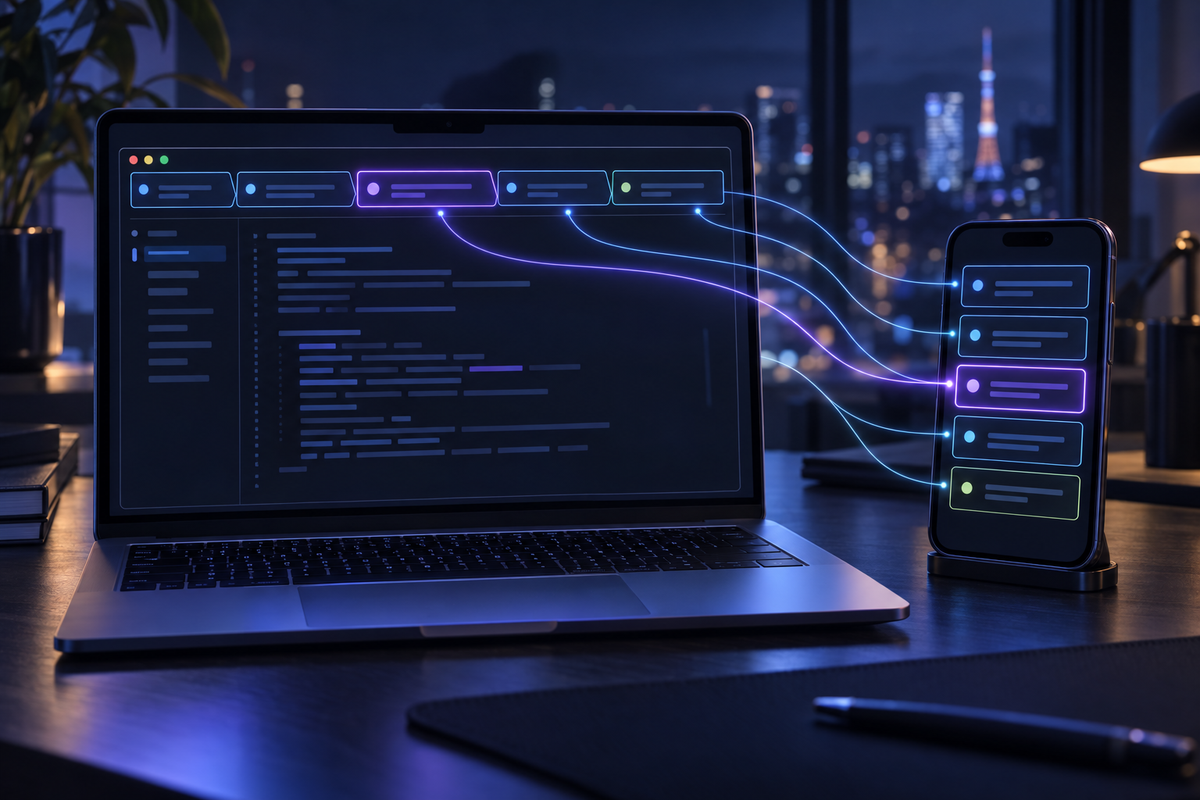
- Names were the first gap. I name my iTerm2 tabs by double-clicking them. Now the tab's name is the session's name, on the phone and in the terminal, and renaming the tab renames it on the phone within seconds.
- Ghosts were the second. A killed or crashed session stays "connected" on the phone with nothing behind it. A small watcher archives it about half a minute later.
- Stragglers were the third. Sessions that were already running, or whose link dropped, get
/remote-controltyped into them, but only while they're idle with an empty prompt. - Verified on the real thing. Live probes before any code, independent reviews of the plan and the code, 95 unit tests, and an end-to-end verifier that drives real iTerm2 windows. Its first run failed and found four things no unit test could. My own sessions found two more.
Start here
| 🧭 | Every session on your phone, with stock Claude Code. No harness needed for this part. 1. Sign in with claude.ai. Remote Control needs a claude.ai subscription login ( 2. Turn on the switch. In a session, run 3. Start a new session. 4. Open the app. In the Claude app, open Code, or open claude.ai/code in a browser. The session is already in the list, under that name. 5. Use it from there. Type a message on the phone and the turn runs in the terminal on your Mac. 6. End it on the Mac. Type 7. Pushes, if you want them. In Headless runs ( |
Why bother
I stand up from the desk with several Claude Code sessions running, one task per session, each in its own iTerm2 tab. Some are working. One is waiting for an answer from me. By the time I'm out of the room, I want all of them in my pocket, under the names they have on my screen.
For a while I did it by hand. Before leaving, I typed /rc in the session I cared about and picked it up in the Claude app. The other tabs stayed at the desk. The one I took showed up under an automatic name, not the name on its tab.
So I made it automatic, in my harness.
What Claude Code already does, and where it stops
More than I expected. As of Claude Code 2.1.314, the version I built against:
- Auto-connect. With the switch on, each interactive process registers one remote session when it starts. Run five sessions, get five on the phone.
- Clean exits clean up. In a pseudo-terminal I measured
/exit, SIGTERM, a hang-up (SIGHUP, what closing a tab sends) and a terminal that vanished under the session. Each one archived the phone's copy within about a second and a half. - Headless runs stay local. With the switch on,
claude -pstarted no Remote Control at all. - Outages are handled. Per the documentation, when the laptop sleeps or the network drops, Claude Code reconnects by itself once the machine is back online. Its troubleshooting notes add one exception: a session that couldn't reach the server for about 30 minutes asks you to run
/remote-controlagain. - Names travel. The phone's title is the session's name, given at start (
--name, or a name after--remote-controlor/remote-control) or later with/rename; without one, the last meaningful message, then a generatedhostname-adjective-noun. A rename made in the app or on claude.ai comes back to the terminal. In my probe that took under two seconds. A SessionStart or UserPromptSubmit hook can also returnsessionTitle, with the same effect as/rename.
If you run one session and name it by hand, that's enough. I run many, and I hit three gaps.
Names that don't match my tabs. I find a session by its tab's name: "AI Harness", "Blog". Claude Code doesn't know that name exists, so a new session gets an automatic one, on the Mac and on the phone. A hook can set the title, but hooks fire on session events, not when I double-click a tab. And in a brand-new session, a SessionStart hook's title is held until the first message. Start a session, walk away without typing, and the phone shows a name I never chose.
Ghosts after a kill. SIGKILL, or a crash, skips the cleanup. The phone keeps showing the session as active and connected, with nothing behind it. A ghost looks exactly like a live session. After a few of them, I stop trusting the list.
Stragglers. The switch only takes effect at start. Everything already running when I turned it on stayed local. A session whose link dropped for good ends up in the same place: it asks me to run /remote-control, on a screen at the desk I just left.
How the mirror works
A killed process can't clean up after itself, and nothing inside Claude Code sees me double-click a tab. Something has to watch from outside. So the mirror has four parts, all in my harness and none of them a patch to Claude Code: the switch, my launcher, my hooks, and a small watcher.
The switch stays on. Every interactive session connects at start, whatever launched it: my launcher, a bare claude, an IDE terminal.
The launcher passes two flags. ai is how I start sessions. It picks the project, then starts and supervises Claude. It now adds --remote-control, plus --name "<the tab's name>" when the tab already has a name.
The first flag looks redundant next to the switch, but it isn't. After an explicit start, Claude Code may send the push "Your Claude Code session is ready — continue from your phone anytime." A session that got Remote Control only from the switch doesn't get that push. And since each process gets one remote session, the flag and the switch can't produce two.
The second flag gets around the held title. The session carries the tab's name from its first second, not from my first message.
The hooks keep the terminal side in step. At session start and at every prompt, a hook hands Claude Code the watcher's name for the session as sessionTitle, whenever the two differ. The terminal's own name, the one in the prompt box and the resume picker, catches up at the next prompt.
The watcher does the rest. It runs one instance per machine, enforced by a file lock. The launcher and the hooks start it detached, from inside iTerm2, and that detail matters: a process started from inside iTerm2 drives iTerm2 without any macOS Automation prompt. It's also why I didn't make the watcher a launchd agent. To macOS, that would be a separate process, with its own Automation permission to grant.
The watcher polls every two seconds, exits after ten minutes with no live sessions, and the launcher checks every minute that it's still running. Each pass does four things:
- List Claude Code's running sessions, comparing each process's start time so a reused process id is never mistaken for an old session.
- Match each process to its iTerm2 tab by its terminal device (tty).
- Read every tab's user-set name in one AppleScript call. The name I give a tab by double-clicking is the session variable
tab.titleOverride. - Act: send names where they differ, archive ghosts, switch stragglers on. It reads the phone's copy of each session every 30 seconds, and right after any change.
The rules at the edges
When it types. For a running session without Remote Control, the watcher does what I'd do myself: it types /remote-control. A probe showed that typing it into an idle session's empty prompt connects the session without a dialog. Typing into a terminal is still the riskiest thing the watcher does, so it gets the strictest rules. It types only into a session that predates the switch or whose link dropped. It waits until the session is idle and the input box on screen is empty on two passes in a row. A fresh session's empty box shows a grey hint, like Try "fix typecheck errors", and plain screen text can't tell that from typing, so the watcher accepts exactly that pattern and checks again: it types the text, reads the box back, and presses Enter only if the box holds exactly /remote-control. If the hint was a real draft after all, the watcher deletes exactly what it typed; anything else, it leaves for me to see. It tries at most twice, ten minutes apart. After that it sends one desktop notification and leaves the session to me.
When it refuses. It never types into a busy session, a prompt with text in it, a menu or a dialog, a session younger than 25 seconds, a tab outside iTerm2, a conversation open in two processes, or a session whose own settings turn Remote Control off. Text in the prompt is my half-written thought. I'd rather miss a reconnect than mangle it. If the text is still there ten minutes later, I get one notification telling me which tab needs a /rc.
Off means off. Claude Code clears a session's link only when it tears the link down, not while it's reconnecting. So when a link disappears, the watcher looks at the old phone copy. If it's still there, the link dropped, and the watcher switches it back on. If it's archived, I turned it off myself, and it stays off. A probe backs that up: choosing "Disconnect this session" in the /remote-control dialog archives the phone copy at once, and so does archiving it in the app.
One direction. The tab's name wins. Rename a session on the phone while its tab has a name, and within about 40 seconds the tab's name comes back. To rename a session, I rename its tab. A tab I never named keeps Claude Code's own naming, and there a rename on the phone sticks.
Echoes. The watcher remembers the names it sent, so an old name that comes back later is a stale write, not a new rename. After three sends of one name in five minutes, it stops insisting and logs why.
Dead processes. The watcher archives a session's phone copy only after its process has been gone from the process list for 30 seconds. A process that still runs is never archived, even if its record looks odd. If the same phone session lives on in another process, as after a relaunch, nothing is archived. A conversation reopened elsewhere gets up to two minutes to reconnect. If the watcher can't read the process list or Claude Code's session records on a pass, it changes nothing on that pass.
How I verified it
Probes first. Before any code changed, I measured stock Claude Code live, in throwaway sessions in a pseudo-terminal.
An independent review of the plan. A fresh Claude with no tools and no memory of my session read the request, the plan and the verifier. It caught three problems. The plan over-promised the phone notification. The watcher could start from a process macOS wouldn't let drive iTerm2. And the verifier never ran my real launcher. It also advised syncing names one way only. I kept two-way at first, because the web-client probe had shown that a rename made elsewhere arrives in the session as an ordinary user rename. The live run proved the reviewer right.
An independent review of the diff. Before landing, another fresh Claude read the whole diff, verifier included. It found four defects. If one file the watcher reads had been unreadable for half a minute, it would have archived every session on my phone. A conversation resumed in a new tab would have taken the old tab's name. Nothing had tested the typing before it would reach my sessions. And one shortcut wrote to Claude Code's own state file, which I'd rather leave to Claude Code. All four are fixed: archiving now needs the process to be gone from the process list, names come from the session's own tab, the typing has its own live test in a throwaway window, and the shortcut is gone. The watcher typed nothing into my real sessions until that test passed.
Unit tests. Ninety-five, with fakes for iTerm2, the clock, processes and the phone side. Many rules depend on timing: 25 seconds, 30 seconds, ten minutes, three sends in five minutes. A fake clock tests them without waiting.
An end-to-end verifier, and its first run. It's the part I trust most. I landed the change with typing switched off and ran it. It failed, and every failure was real:
- The phone side had started wrapping each session record in a new envelope. Claude Code's own parser accepts either shape; mine knew only the old one, so every read came back empty, and no name ever reached the phone.
- iTerm2 3.7.6 won't let AppleScript set a tab's name. Setting a tab's title fails, and AppleScript may set only user-defined variables, not the tab's name. The phone-to-tab half of the renames had never worked; the unit tests had faked it. So names flow one way now.
- A fresh session's empty prompt isn't empty on screen. It shows the hint, and the strict rule would never have switched such a session on.
- One test session ended seconds after it started. iTerm2 then showed a modal warning, and every AppleScript call after it timed out.
A third independent review read just those fixes and caught four more edge cases before they landed: a cleared tab name, a tab named after its session already had a name, split panes, and an undo that could have eaten a key I pressed in the same half second. The verifier now renames tabs through iTerm2's own API, exactly as a double-click does, without taking focus. It opens throwaway iTerm2 windows and checks every promise against the phone side's own record of the session, including what the table doesn't show:
- typing
/remote-controlinto an empty prompt connects the session without sending anything to the model, and a draft in the prompt is left alone; - two panes in one tab both carry its name, and a pane renamed on its own keeps that name;
- in a tab I never named, the watcher stays out of the way;
- nothing but the watcher's own
/remote-controlis typed into my sessions, and they come out unharmed.
And then my own sessions. When I switched typing on, the watcher typed /remote-control into two of my long-running sessions, and neither got its Enter. A session with hours of history redraws its screen late. The read-back came before the text appeared, saw an empty box, and the watcher held back, as designed. Nothing was lost, but the command sat there unsent. I switched typing off within a minute and pressed Enter in both myself. Now the watcher keeps reading for up to six seconds, presses Enter only after it sees exactly the command on two reads a second apart, and finishes a late one on a later pass. An independent review of that fix found that my first version could have pressed Enter on a command I had typed myself, and that one session's slow typing could leave another's status stale. Both were fixed before typing went back on.
The same evening found one more. A session with a command still running in the background doesn't report itself idle, so the watcher kept passing over the very session I was writing this in. Its input box is just as free, so that state counts as idle now. The watcher switched it on at its next idle moment, with a review still running in the background.
The final run. I ran the whole verifier eight times as the code changed. The last full run came after all of these fixes, on the final code. Every check passed but two: the typing test, whose window disappeared mid-run, and the unit suite. Both passed when rerun alone on the same code. I didn't time a quit of my real iTerm2, since that would end the sessions I was working in.
Limits
- The push isn't mine to send. Every launch through
aiis an explicit start, so the "session ready" push can come. I can't guarantee one per session. Either way, every session is in the app's list from the start. - Outside iTerm2, names are Claude Code's own. Sessions in an IDE terminal or Terminal.app still get Remote Control from the switch, and a running watcher archives a killed one too. They just don't get my tab names.
- The watcher runs only after something in iTerm2 starts it. After a power loss, the next watcher cleans up the ghosts the last one couldn't.
- Archived, not deleted. A session that ends is archived on the phone, the same thing Claude Code does on
/exit. Nothing in the mirror deletes a conversation. That stays a deliberate act in the app. - The phone side isn't a public API. The watcher reads, renames and archives sessions through the same service Claude Code and the app use, which isn't documented for anyone else. It changed once while I was building this, and the verifier caught it. If it changes again, the verifier is how I'll notice, and everything Claude Code does natively keeps working.
Where sessions live now
A Claude Code session still runs on my Mac, next to the code and the tools it works with. The iTerm2 tab, the app and claude.ai/code are three windows onto one conversation, with one name and one ending.