Sinapt: One Cockpit for the AI-Native Operator
A product concept for connecting coding agents, an editor and a shared knowledge layer. The article explores integration requirements and the boundaries a prototype would need to test.

This workflow combines AI-assisted implementation, a separate review pass and a searchable engineering knowledge base. The next question is whether a common interface could make those components easier to operate together.
This setup has also exposed an integration limit.
This piece is two things at once. First — a consolidation of where the workflow has actually landed after dozens of iterations. I've written about the load-bearing pieces along the way: From AI Skeptic to AI Architect is the origin story; The Cockpit, The Knowledge Base That Builds Itself, KISS Your AI Workflow, and Two Models, One Branch are the structural beams. Second — a brainstorm about an imaginary product that would close the loop. I'm calling it Sinapt.
Publishing it is how the idea exits my head. First the thought. Then the words. Then — eventually — the action.
Before AI
Here's what the cockpit used to look like.
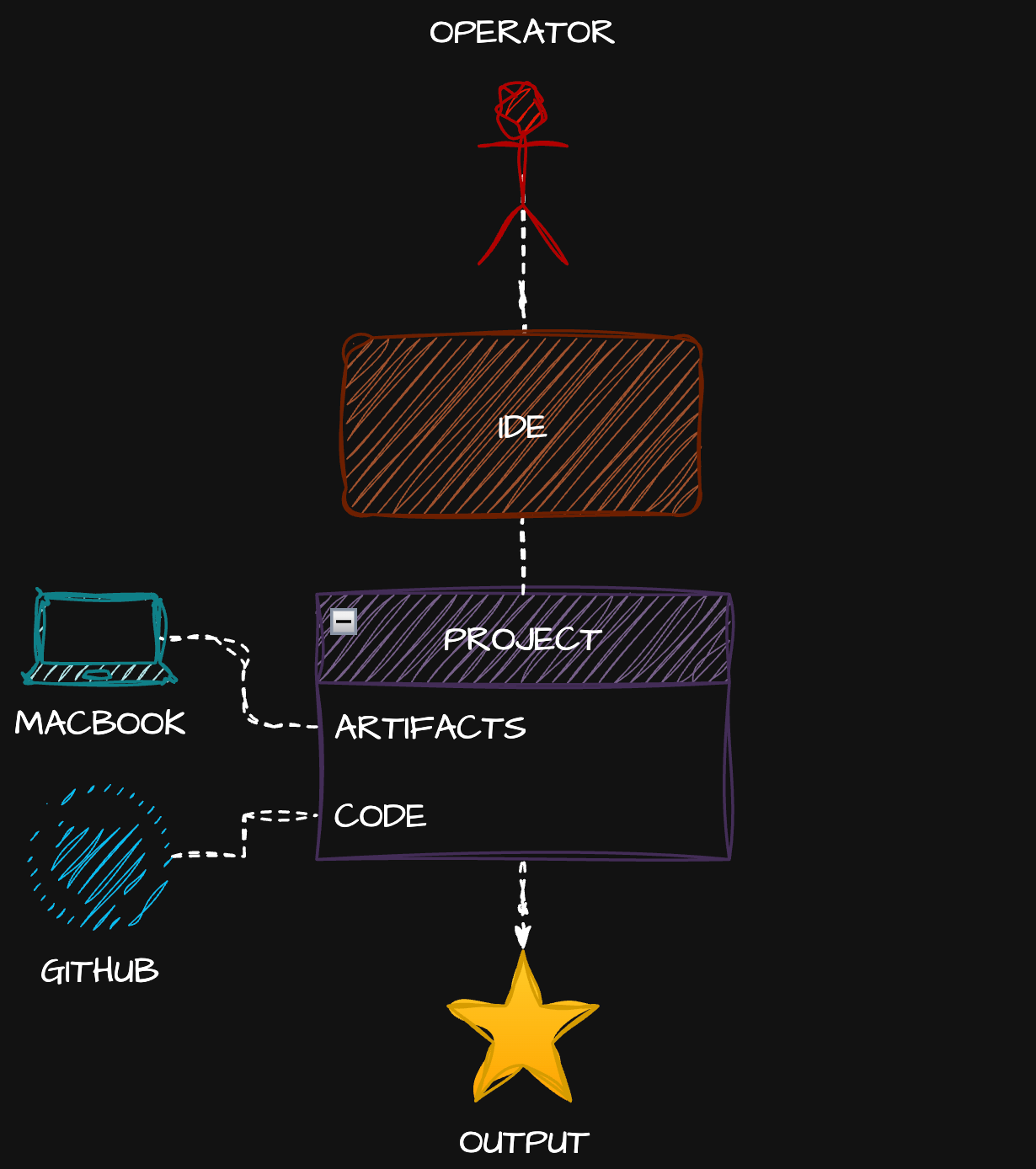
One operator. One IDE — VS Code, JetBrains, Sublime, take your pick. One project on disk: artifacts and code, mostly code. One repo on GitHub. Output. The end.
The setup was simple. The work was hard. Software engineering was slow because humans wrote every line, and humans are slow. But the cockpit was clean: one application, one window, one mental context. You opened your editor and you worked.
That clarity is gone. We don't want it back — what we got in exchange is too valuable to give up. But it's worth remembering what simple looked like.
The current AI-native cockpit
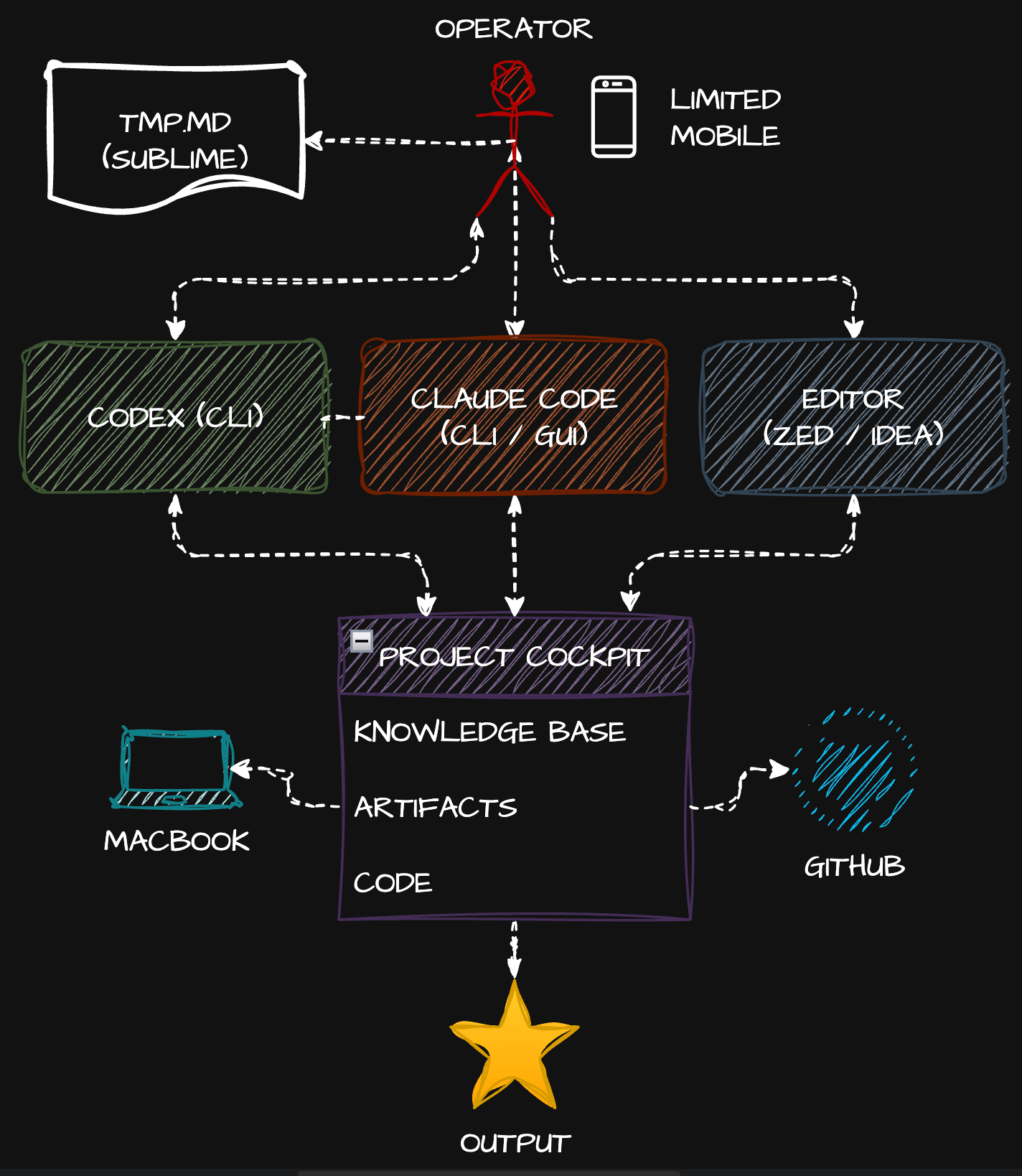
After a year of practice, this is where I actually operate today. Every component on the diagram is something I've documented, and every choice is opinionated.
Multiple agents on the MacBook
Claude Code is the primary architect — both CLI and the redesigned Desktop GUI. Codex CLI sits beside it as the second pair of eyes for review — different model, different process, different blind spots. The two-agent dance is now muscle memory: do codex review, three words, zero context switches.
A scratch prompt buffer
I keep a tmp.md file open in Sublime Text on the desktop at all times. Prompts get drafted, sharpened, and persisted there before they go to an agent. Cheap, fast, never lost. The friction of "what was that prompt I almost ran yesterday?" disappears.
An editor for the surface
Zed for blazing-fast file navigation, structure, quick edits, GitHub operations. JetBrains IDEA when I need heavy artillery — refactoring, debugging, deeper language tooling. The editor is no longer the cockpit; it's an instrument the cockpit reaches for.
A project cockpit on disk
Artifacts plus code plus a self-maintaining knowledge base in markdown — exactly the structure laid out in The Cockpit and The Knowledge Base That Builds Itself. The KB updates automatically on git hooks, gets re-indexed by QMD for hybrid lexical+vector search, and stays compact because agents query it on demand instead of loading the whole thing into context. The progression is documented across The Knowledge Equation, The Context Wall, and The Exomind.
Limited mobile
Remote control via /rc is real but thin. It's a chat surface for the Mac that's actually doing the work. Useful for small interventions, awkward for anything structural — copy-paste between desktop and mobile, occasional connection issues, no local execution.
The architecture combines agents, review and maintained context. Its effectiveness depends on task scope, integration quality and verification; no productivity multiplier or private usage measurement is established here.
But.
What it costs
Compare diagram two to diagram one. The operator now juggles four-plus active applications, multiple monitors, and the cognitive overhead of switching between Sublime, Codex, Claude Code, Zed/IDEA, browser, and the cockpit's file structure. Per project. Multiply by however many projects you maintain.
I'm a practitioner of KISS and minimalism. I've subtracted aggressively. This setup is the floor of what I can get away with — not the ceiling of what's possible.
Einstein's heuristic — make things as simple as possible, but not simpler — accepts that some problems carry irreducible complexity. AI-native development is one of them. The complexity in diagram two isn't bloat; it's the price of the new capability.
Image two is my sweet spot. Not because I love it, but because every attempt I've made to simplify further loses real capability, and every attempt to "improve" further adds disproportionate complexity.
The coordination cost comes from keeping several tools and work streams aligned. As Slow Down, Human argued, orchestration can become the bottleneck even when typing is no longer one.
The two real problems
1. Cognitive load from too many cockpits. Multiple apps, multiple windows, multiple contexts to maintain in my head. Each project has its own configured cockpit. Each cockpit needs its own attention. There's no single control surface — the operator IS the integration layer.
2. Shared knowledge access needs an explicit design. This local cockpit does not yet expose its knowledge store to teammates or remote agents. Keeping it outside a code repository is a placement choice, not an inherent barrier to sharing.
Sharing skills doesn't solve this. A skill is a packaged behavior; a knowledge base is the project's accumulated context. They're different artifacts.
Remote execution needs an authorized way to reach relevant context. A separately shared repository, synchronized store, mounted data or authenticated retrieval service are possible designs. Each must preserve the source permissions and distinguish shared project records from personal workflow notes.
These are integration requirements for this proposed setup. They are not evidence that the wider field has no solution.
What if there was just one application again?
Here's the brainstorm.
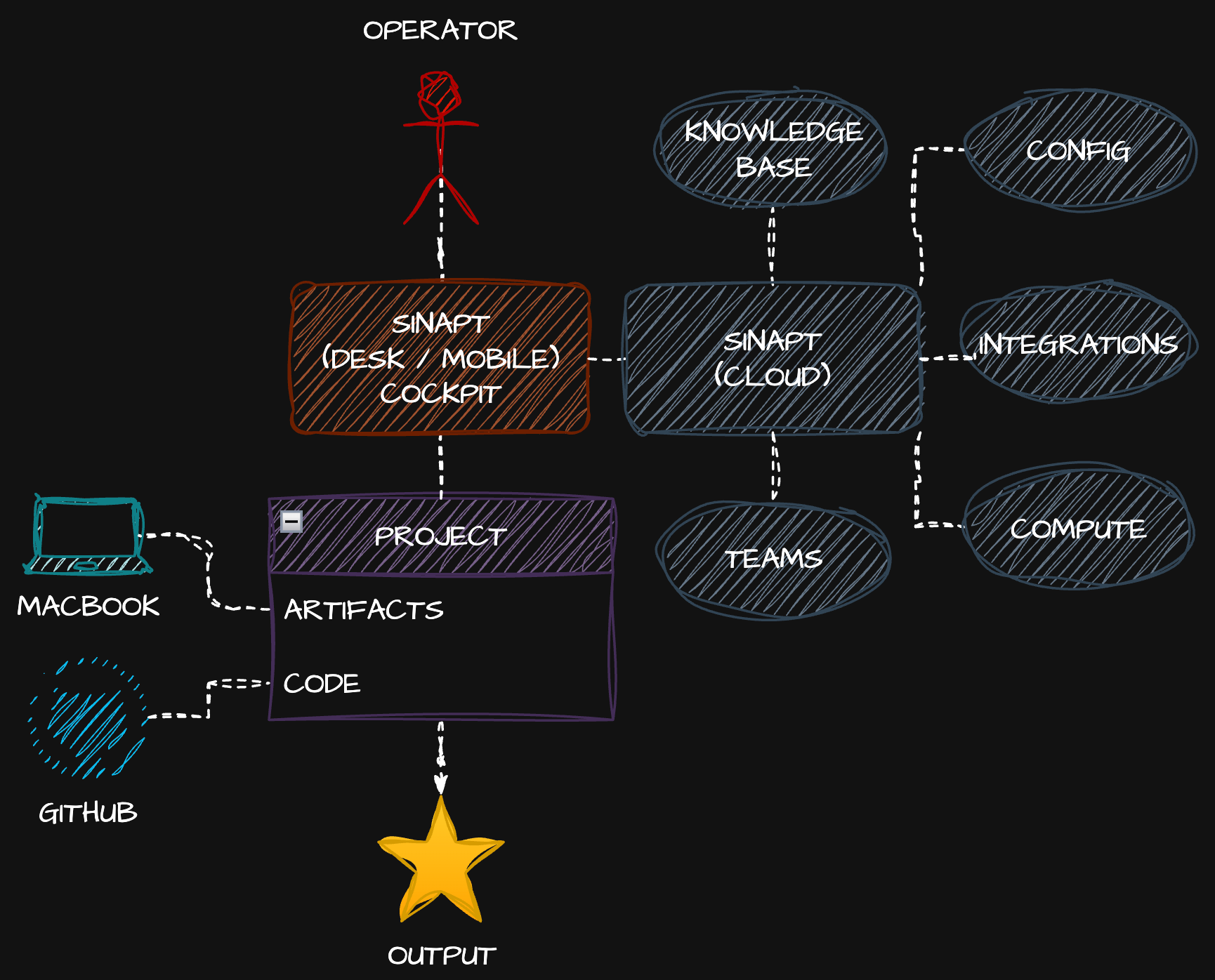
Look at the operator in diagram three and compare to diagram one. One connection, one application. The cockpit is collapsed back to a single surface — desktop, mobile, same thing — and the operator's attention has somewhere to land instead of fragmenting across four apps.
But unlike diagram one, the surface isn't an IDE. It's an AI-native cockpit. Sinapt.
Internally, Sinapt does what diagram two does. It orchestrates Claude Code and Codex, embeds a fast file-tree editor for project navigation and inline edits, manages GitHub operations, holds the scratch-prompt buffer, and looks like one window because it is one window. The complexity from diagram two doesn't disappear — it stops landing on the operator.
The project on disk goes back to diagram one's shape. Just artifacts and code. No knowledge base in the repo. Clean.
The knowledge base, configuration, integrations, compute, and team scoping all move to Sinapt Cloud. This is where the architectural problems from diagram two get solved:
- Knowledge bases are first-class cloud objects with team and privacy scoping. A project KB can be private to me, shared with a team, or layered (team-public + my-private notes on top). Switch machines and everything is there. Onboard a teammate and they get the team-shared KB instantly.
- Integrations live in the cloud — Linear, Jira, Confluence, Slack, GitHub, anything — with credentials stored securely once and inherited across machines.
- Compute is available on tap. Long-running agentic jobs run in the cloud with full knowledge base access — a capability the proposed setup would need to implement and verify.
- Configuration follows the operator. No more re-bootstrapping a new machine for two days.
How Sinapt is not Cursor or JetBrains Air
Someone is going to ask: doesn't Cursor already do this? Or JetBrains Air?
The architectural concern is duplicated access layers: a separate subscription for the interface, model access through that interface, and potentially additional API billing. A workflow that already uses local agent tools should evaluate whether the added layer supplies enough capability to justify its cost and permission model.
Sinapt's architectural premise: integrate with the CLIs you already have. Claude Code CLI is on the machine, logged in, permissions sorted. Codex CLI same. Sinapt drives them — it doesn't replace them, it doesn't broker them, it doesn't double-charge for them. You bring your existing subscriptions and Sinapt orchestrates around them. The cloud layer (KB, integrations, compute, teams) is what you'd actually pay for, because it supplies shared knowledge, integrations, compute and team coordination.
The distinction matters: Cursor and friends are AI editors. Sinapt is an AI-native cockpit that integrates the AI tools you already pay for and adds a proposed team/cloud integration around those tools. It's the natural evolution of the pattern rather than a competitor in the same lane.
Why this is evolution, not replacement
Scroll back to diagram one and diagram three. The operator's workflow is the same: one application, one project, one repo, one output. That's the simplicity reclaimed.
Compare diagram two (today) to diagram three. What's actually changed is who carries the complexity. In diagram two, the operator does. In diagram three, Sinapt does. The agents, knowledge bases, integrations, multi-process orchestration, all of it still happens — it just happens behind the cockpit instead of in front of it.
That's the move. Same power as today. Operator burden of pre-AI.
It's the same trajectory described in The Last Interface and The Last Machine: every generation of tooling moves complexity further from the human, until eventually the interface disappears entirely. Sinapt is one step on that path — not the endpoint, but a real step. Within the broader timeline of Decade Zero, this is just what consolidation looks like at the workflow layer.
What's next
Right now, Sinapt is an idea. It exists as words in this article and a hand-drawn diagram on my whiteboard. That's where everything starts: thought, then word, then action. Publishing the words is how you commit to the next step.
I'm spending real cycles on what this could look like — both architecturally and as a product. If you want to see how it evolves from idea to working software, subscribe. The next chapters are coming.